
AKASO EK7000 4K30FPS
4.4Editor score
4K Ultra HD video
Built-in EIS stabilization
Wireless wrist remote control
Filming pickleball games requires cameras that handle fast movement and bright courts. A good action camera stabilizes shake, captures sharp video, and tracks players automatically without needing a dedicated operator on the sidelines.
We compared ten top models based on resolution, stabilization, battery life, and smart features like AI tracking. Each pick offers unique strengths for recording matches, analyzing technique, or sharing highlights with friends and family online.
Every section details a specific camera's performance, pros, cons, and ideal use cases for pickleball enthusiasts. Note that prices and availability change frequently, so check the linked retailer for the most current offers before purchasing your gear today.
4.4Editor score

4.7Editor score

4.6Editor score
As an Amazon Associate we earn from qualifying purchases.
This side-by-side comparison highlights the key specifications and unique features of each camera model to help you choose the perfect device for recording your next pickleball match or tournament.


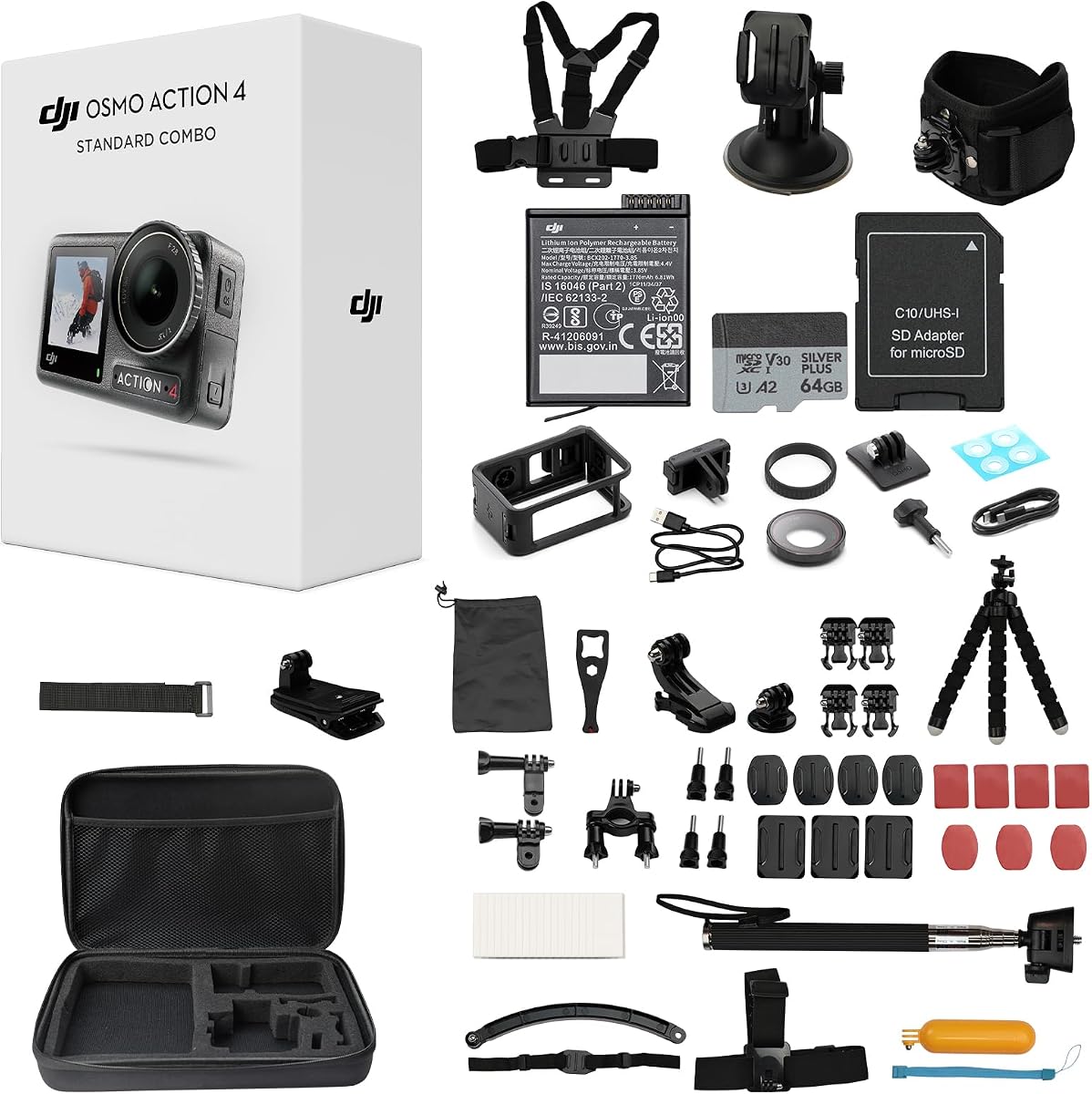
The DJI Osmo Action 4 earns our top spot for recording pickleball due to its superb image quality and user-friendly design. It balances high-end features with ease of use, making it perfect for players who want to capture every rally without technical fuss.
We may earn a commission when you buy through this link, at no additional cost to you.
Its 1/1.3-inch sensor handles bright outdoor courts and shaded indoor arenas with equal finesse. The magnetic quick-release system lets you switch the camera from a tripod to a chest mount in seconds. This flexibility is crucial for capturing varied angles during intense gameplay.
While it lacks the raw resolution of 8K cameras, the color science and stabilization are unmatched at this price point. The D-Log M profile gives you flexibility in post-production if you edit your footage later.
Buy this if you want a reliable, high-performance camera that works well in diverse lighting conditions. Its build quality and battery life ensure you won't miss a key moment during long tournament days.
The three stabilization modes keep footage smooth even when the camera moves or the ball speeds across the court.
The 10-bit color depth ensures white lines and green courts look natural and distinct in every frame.
We may earn a commission when you buy through this link, at no additional cost to you.
For those new to filming sports, the AKASO EK7000 offers incredible value with solid 4K performance. It strips away expensive features while keeping the core functions needed to record matches on a budget without sacrificing too much quality.
We may earn a commission when you buy through this link, at no additional cost to you.
The built-in EIS stabilization works well enough for static tripod shots on the court. You can use the included waterproof case to protect the camera from splashes or unexpected rain during outdoor games.
The remote control makes it easy to start and stop recording from a distance, which is helpful if you are playing while filming. However, you must be careful not to get the remote wet.
Choose this model if you want to try action cameras without a large investment. It proves that you do not need to spend hundreds to capture decent highlights of your favorite sport.
You get professional resolution at a fraction of the cost of premium competitors.
The kit includes mounts and a case, so you are ready to film immediately.
We may earn a commission when you buy through this link, at no additional cost to you.
The Insta360 X5 redefines how you record pickleball by capturing everything around it. This is perfect for solo players or coaches who need to track multiple players without manually panning a camera during a game.
We may earn a commission when you buy through this link, at no additional cost to you.
Its unique 360 capability means you never miss a shot. You can choose the best angle later in the app, framing the action like a director. The invisible selfie stick effect creates engaging, dynamic shots.
Stabilization is robust, keeping footage smooth even if the camera is handheld. The replaceable lenses add durability, ensuring the camera lasts through years of active use on dusty courts.
Invest in this if you want creative control and the ability to review every player movement. It is the ultimate tool for tactical analysis and sharing unique perspectives with your sports community.
The 360 capture ensures the ball stays in view regardless of where the rally goes.
Replaceable lenses mean a scratch or crack won't ruin your entire device.
We may earn a commission when you buy through this link, at no additional cost to you.
Indoor courts often have challenging lighting that washes out or darkens video. The DJI Osmo Action 5 Pro handles these conditions with its advanced sensor and dynamic range, ensuring clear footage even under flickering lights.
We may earn a commission when you buy through this link, at no additional cost to you.
Its always centered focus keeps players sharp even during fast movement. The battery life is impressive, allowing you to record multiple matches without swapping batteries or worrying about power.
Voice control adds convenience when your hands are busy or wet. You can start recording with a command, making it easier to capture spontaneous moments without fumbling for buttons.
This is the ideal choice for indoor tournament play. The clarity and reliability in tricky environments make it a standout for serious athletes recording their performance.
It balances shadows and bright windows without losing detail in either area.
Voice commands let you focus on your game while the camera records automatically.
We may earn a commission when you buy through this link, at no additional cost to you.
The Action 6 pushes video fidelity with 8K resolution, allowing you to zoom into footage without losing sharpness. This is great for analyzing technique or cropping shots for social media later.
We may earn a commission when you buy through this link, at no additional cost to you.
Built-in storage means you can shoot immediately without buying cards. The bundle includes extras, ensuring you have plenty of power and space for long recording sessions.
Dual mic support is perfect if you plan to interview players or commentate while filming. The variable aperture lets you adjust light intake for better control over exposure.
Buy this if you want the highest resolution available and hate managing memory cards. It simplifies the workflow while delivering professional-grade image quality.
The 8K resolution allows you to crop video later while keeping details sharp.
Built-in storage and included batteries reduce the gear you need to carry.
We may earn a commission when you buy through this link, at no additional cost to you.
This essential combo brings the 8K power of the Action 6 in a compact form. It is perfect for travel or casual filming where you want top-tier specs without the bulk of larger systems.
We may earn a commission when you buy through this link, at no additional cost to you.
Gesture control lets you stop recording with a wave, which is handy when playing doubles. Cloud upload automatically backs up your footage, so you never lose a match highlight to hardware failure.
The large sensor ensures vibrant colors and clear details. Even in the essential bundle, the core performance matches the premium versions closely.
Choose this if you want the latest tech and cloud convenience. It balances high-end features with portability for everyday use on the court.
Footage is backed up automatically, giving you peace of mind during matches.
Simple hand gestures allow quick control without touching the camera.
We may earn a commission when you buy through this link, at no additional cost to you.
GoPro remains a leader in action camera technology. The HERO12 Black offers HyperSmooth 6.0 which is arguably the best stabilization available. This ensures your footage looks steady even if the camera is mounted on a moving surface.
We may earn a commission when you buy through this link, at no additional cost to you.
The ecosystem of mounts and accessories is vast. You can find a mount for any angle, from chest to helmet to court side. Live streaming allows you to share games in real time with remote viewers.
HDR mode enhances dynamic range, capturing details in shadows and highlights. While the battery life is decent, using HDR may reduce recording time per charge.
Select this if you value stability and accessories. It is a reliable workhorse for athletes who need a camera that just works without setup headaches.
HyperSmooth 6.0 smooths out bumps so the ball looks like it moves in a straight line.
The wide range of official mounts ensures you can attach the camera anywhere.
We may earn a commission when you buy through this link, at no additional cost to you.
This bundle adds immediate value by including an SD card and accessory kit. You save money and time buying these separately, making it a convenient choice for new buyers.
We may earn a commission when you buy through this link, at no additional cost to you.
The camera itself performs like the standard model with excellent color and stabilization. The accessory kit helps you mount the camera securely in different positions for varied shots.
Slow motion at 120fps is fun for analyzing serves and smashes. The magnetic mounting remains a standout feature that simplifies setup on the court.
Choose this bundle if you want a complete setup right out of the box. It removes the hassle of buying extra gear and ensures you can start filming immediately.
The included accessories save you from needing extra purchases before your first shoot.
120fps video lets you see fast ball movement frame by frame for better technique.
We may earn a commission when you buy through this link, at no additional cost to you.
The HERO12 excels at sharing content quickly. Its software allows direct uploads to platforms, making it easy to post highlights right after a match. This is a big plus for content creators.
We may earn a commission when you buy through this link, at no additional cost to you.
Webcam mode allows you to use the camera for calls, adding versatility beyond sports. It also maintains waterproofing without a case, which is great for durability and convenience.
Stabilization keeps clips looking professional for social feeds. The HDR ensures your videos look vibrant on bright screens.
This is ideal for players who want to share their matches instantly. The connectivity and sharing features save time and simplify the process of documenting your sport.
Direct upload features make it easy to post your best moments to social media immediately.
Waterproof without needing extra housing makes setup and cleaning much easier.
We may earn a commission when you buy through this link, at no additional cost to you.
The XbotGo Falcon offers a unique selling point: AI tracking that follows players automatically. This is perfect for recording games when you cannot afford a camera operator or assistant.
We may earn a commission when you buy through this link, at no additional cost to you.
The dual lens system captures video and tracking data simultaneously. This setup ensures you never miss the ball or players even if the action moves quickly across the court.
While the setup is more complex than standard cameras, the payoff is significant. You can focus on playing or coaching while the camera handles the recording work.
Choose this if you need hands-free recording for coaching. The AI features are a game changer for automated content creation during practice or tournaments.
The AI keeps players in frame automatically, reducing manual camera movement.
Separate lenses for recording and tracking optimize performance for sports capture.
We may earn a commission when you buy through this link, at no additional cost to you.
Choosing the right camera requires balancing resolution, stabilization, and ease of use. This guide outlines the critical factors to consider for recording pickleball effectively.
Resolution determines how sharp your video looks. For pickleball, 4K is standard, allowing you to zoom in on techniques without losing clarity. Frame rate matters for smooth playback. Higher fps captures fast movements better, but 4K30fps is usually sufficient for most players.
Prioritize 4K resolution for clear detail of court lines and ball movement. If you need slow motion, look for cameras offering 60fps or higher in 4K to maintain quality.
Action cameras often move or vibrate during use. Good stabilization ensures your video remains smooth. Electronic Image Stabilization (EIS) is common and effective for static shots. Some cameras offer advanced hybrid systems for handheld movement.
Select a camera with proven stabilization like HyperSmooth or HorizonSteady. This prevents shaky footage that makes it hard to follow the ball during a rally.
Outdoor matches can encounter rain or splashes. An internal waterproof rating of at least 33ft protects against elements without a bulky case. Durability also includes resistance to drops and dust, which are common on sports courts.
Ensure the camera meets at least IP68 ratings for water and dust. This protects your investment during long outdoor sessions without extra housing.
Filming a full match takes time. Battery life varies by resolution and usage. Look for cameras offering at least two hours of continuous recording. Swappable batteries are a plus for long tournaments.
Aim for at least 100 minutes of continuous recording. Carry a spare battery if you plan to record multiple matches in a row without charging.
Sharing clips is often the goal. Wi-Fi connectivity and companion apps make transferring files to phones easier. Live streaming capabilities allow you to broadcast games to remote viewers in real time.
Check for reliable Wi-Fi and app quality. Good software makes it easier to trim and share clips directly from your phone after the game.
Audio captures the sound of the game, which adds realism. Built-in microphones handle ambient noise, but wind can interfere. Some cameras support external mics for clearer dialogue during coaching.
Look for built-in wind reduction or external mic support. Clear audio ensures viewers hear the impact of shots and commentary.
Mounting determines your viewing angle. Magnetic mounts allow quick changes, while adhesive mounts stay put. Ensure the camera fits standard mounts so you can buy compatible accessories later.
Choose a camera with versatile mounting options. Magnetic systems are best for quick angle changes during practice sessions.
Prices range from budget-friendly to premium. Decide if you need extra features like 8K or AI tracking. Often, standard 4K models offer the best value for casual filming.
Set a budget based on your needs. If you just need highlights, a budget camera works. If you need professional analysis, invest in higher-end specs.
Mount your camera on a stable surface away from the playing area to avoid accidents. Ensure the view captures the full court so players stay in frame during play.
Check battery and memory card status before each session. Clear out old footage to make space for new matches. This prevents interruptions when trying to record key moments.
Clean the lens regularly with a soft cloth to remove dust and fingerprints. Avoid touching the glass directly to prevent smudges that could ruin video quality.
4K resolution is generally the best choice for filming pickleball. It provides enough detail to zoom in on techniques and court lines without requiring massive storage like 8K. Most modern cameras handle 4K30fps well for sports.
Standard mounts work for most setups, but magnetic mounts offer the most flexibility. You can switch between tripod and handheld quickly. Ensure any mount you buy is secure enough to handle the vibration of gameplay.
Yes, action cameras work indoors but you need to ensure sufficient lighting. Some models have better low-light sensors than others. Check dynamic range features to avoid grainy footage under indoor lights.
Use the camera's built-in stabilization features like HyperSmooth or RockSteady. Place the camera on a sturdy tripod or mount it to a rigid surface. Avoid handheld shooting unless you need POV shots specifically.
360 video is highly useful for tracking players without missing shots. It allows you to reframe the action later in post-production. This is great for coaches analyzing movement patterns during matches.
Use the companion app provided by the camera brand. Connect via Wi-Fi and download clips directly to your phone. Most cameras allow quick trimming and sharing through their mobile apps.
Yes, a waterproof rating is essential for outdoor play. It protects against rain, sweat, and accidental drops. Most action cameras are waterproof out of the box up to 33 feet or more.
Buy a spare battery and a memory card immediately. A tripod or stable mount is also essential. An extra lens cover or cleaning kit helps maintain clarity for future recordings.
We have reviewed ten top cameras ranging from budget picks to high-end AI trackers. The DJI Osmo Action 4 stands out for its balance of quality and ease of use. The Insta360 X5 offers unique creative possibilities for analysis.
Prioritize stabilization and battery life when selecting your device. A stable shot makes the video watchable while long battery life ensures you do not miss the final points. Consider your storage needs and mounting preferences too.
Remember that prices and models change frequently. Always verify the latest specs and current offers before buying. Choose the camera that fits your specific filming style to capture every match perfectly.