
SUNLU Filament Dryer Box 2026 New Upgrade S1 Plus
4.3Editor score
Fast fan-assisted drying
2-inch LCD display
35 to 55 degrees C
This guide compares the top filament dryer box models for 2026, evaluating heating speed, capacity, and sealing to help you choose the best moisture protection
Moisture is the silent enemy of high-quality 3D printing, causing stringing, bubbling, and poor layer adhesion. A reliable filament dryer box actively removes humidity from your spools, ensuring consistent material performance and reducing waste over time.
We evaluated ten leading models based on heating technology, capacity, sealing quality, and user interface. Our analysis focuses on real-world performance data to help you identify the best solution for your specific filament types and printing environment.
Each pick below highlights unique strengths, from budget-friendly single-spool units to high-capacity dual-chamber systems. Remember that availability and specifications can change, so verify current details before making your final purchase decision.
4.3Editor score
4.4Editor score

4.6Editor score
The following table provides a side-by-side comparison of all ten featured models, highlighting their key specifications to help you quickly identify the unit that best matches your printing volume and material requirements.


The SUNLU S1 Plus stands out as a top budget-friendly option for managing filament moisture effectively. It holds a solid 4.3 rating and features an upgraded fan design that significantly speeds up the discharge of excess water compared to passive models.
We may earn a commission when you buy through this link, at no additional cost to you.
Its standout quality is the visual display, which accurately detects and shows temperature, time, and humidity on a 2-inch LCD screen. Users can easily adjust settings between 35 and 55 degrees Celsius to suit different materials like PLA or PETG.
While it lacks the capacity of larger units, the personalization settings allow for precise control over drying cycles. The high compatibility ensures it works well with 1.75mm, 2.85mm, and 3.00mm filaments from major brands without issues.
This dryer is ideal for hobbyists who print frequently but do not need to dry multiple spools simultaneously. Its straightforward design and effective drying capability make it a strong recommendation for those entering the filament maintenance space.
The fan design accelerates moisture removal, reducing the time filament needs to sit before printing.
The LCD screen provides real-time feedback, ensuring you can monitor the drying process without guessing.
We may earn a commission when you buy through this link, at no additional cost to you.
The Creality Space Pi X4 represents a premium choice for users with high-volume printing needs. With a 4.6 rating, it offers spacious storage for four standard 1kg spools or two large 2kg spools, making it the ultimate solution for busy workshops.
We may earn a commission when you buy through this link, at no additional cost to you.
Its dual independent 200W heating chambers allow for drying up to two different filament types simultaneously at different temperatures. This efficiency is unmatched, removing moisture 30% faster than single-chamber dryers and preventing issues like bubbling and stringing.
Beyond active drying, it functions as a long-term storage unit with a silicone-sealed enclosure. This design prevents moisture re-absorption 24/7, ensuring spools remain print-ready even during extended printing pauses without breaking the humidity control.
For professionals or serious enthusiasts managing diverse material inventories, this model provides the scalability and performance needed to maintain consistent quality. The industry-first touch UI further simplifies operation for complex filament requirements.
Independent zones let you dry ABS and PLA at the same time with different target temperatures.
The sealed environment acts as a safe haven for unused spools, extending their shelf life.
We may earn a commission when you buy through this link, at no additional cost to you.
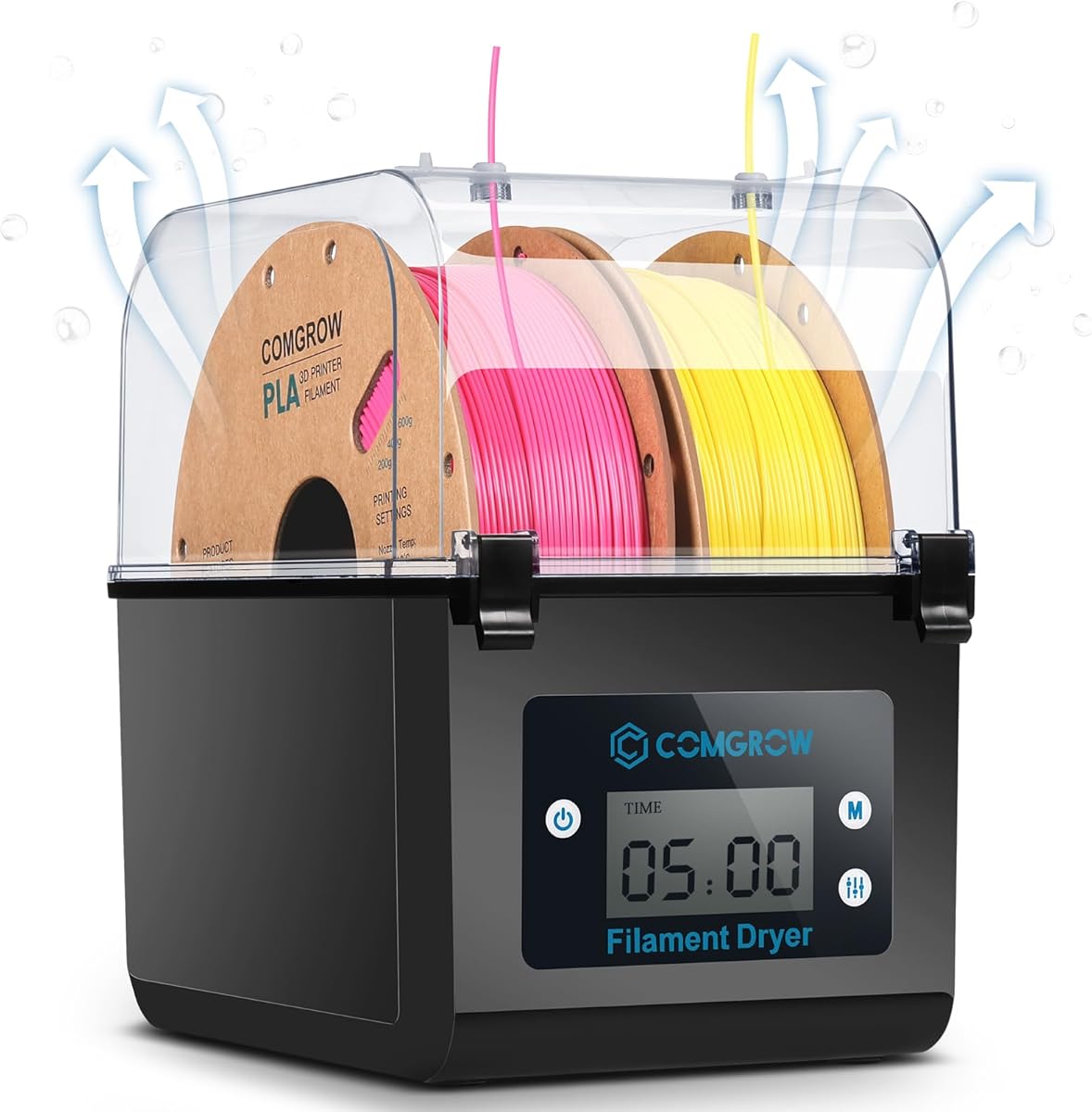
The Comgrow SH01 is our Editor's Choice for its balance of capacity and cost. It holds a 4.4 rating and stores two rolls of 1kg spools, offering a large internal size that fits various filament types without cramping.
We may earn a commission when you buy through this link, at no additional cost to you.
Its unique design allows for internal heating during printing, which keeps filament dry as it feeds into the printer. This avoids common issues like clogging and layer migration caused by dampness, ensuring a smoother print surface.
The device features a 2-inch LCD screen for real-time monitoring of temperature and humidity, making operation straightforward. The outlet structure uses a silicone cable sheath for a smooth feed while maintaining a good seal against external moisture.
Ideal for general users who want reliable drying without complex setups, this model delivers consistent results. Its simple operation and effective moisture removal make it a practical addition to any standard 3D printing station.
Heating the filament during use prevents moisture absorption that often happens after long print jobs.
The snap button structure on the cover and silicone seals ensure moisture stays out effectively.
We may earn a commission when you buy through this link, at no additional cost to you.
The Polymaker Polydryer focuses on consistent protection without active heating elements. With a 4.4 rating, it helps keep moisture-sensitive filament in a better printing state by reducing exposure to humid air between uses.
We may earn a commission when you buy through this link, at no additional cost to you.
Unlike electric dryers, this solution relies on a sealed enclosure design combined with desiccant support to lock out moisture. This approach is ideal for longer-term storage needs where you want to keep spools dry while waiting for the next job.
A built-in hygrometer allows you to track storage conditions easily, providing a visible humidity reading to judge the environment without guesswork. This helps maintain a suitable climate for your filament using simple passive management.
This model is perfect for users who print occasionally and prefer a low-maintenance storage solution. It supports various types including PLA, PETG, and ABS, making it a versatile option for keeping your material in peak condition.
The desiccant and sealed design work together to maintain a dry environment without electricity.
The hygrometer makes it simple to see when your desiccant needs refreshing or the seal is compromised.
We may earn a commission when you buy through this link, at no additional cost to you.
The SUNLU S2 is designed specifically to remove excess moisture and revive old filament that has been stored for a while. It holds a 4.3 rating and offers a large capacity of 265x274x118mm to handle substantial spool sizes.
We may earn a commission when you buy through this link, at no additional cost to you.
Its fast heating capability ensures the dryer reaches preset temperatures quickly, while the built-in spindle keeps the filament spinning continuously for even drying. Users can customize times from 0 to 99 hours to suit specific material requirements.
The large touch screen makes it simple to set different dry temperatures and times with just a tap, ensuring user-friendly operation. A translucent lid allows you to check on the filament progress without opening the lid and breaking the drying environment.
This dryer is a great investment for those who have their printers in humid locations like basements. It optimizes the printing process by ensuring damp materials are restored to optimal condition, reducing waste and improving print quality.
Specifically engineered to restore old, damp filament that would otherwise be unusable or problematic.
The internal spindle ensures the entire length of the spool gets uniform heat treatment.
We may earn a commission when you buy through this link, at no additional cost to you.
The Comgrow SH02 distinguishes itself with one-key temperature settings for nine different types of filaments, including PLA, ABS, and PC. It holds a 4.4 rating and accommodates two rolls of 1kg filament, making it efficient for dual-printer setups.
We may earn a commission when you buy through this link, at no additional cost to you.
Its 150W PTC heater allows it to reach 50°C in seven minutes, circulating hot air 360° for uniform heating. The intelligent safety protection automatically cuts off heating if the temperature exceeds 130°C to prevent burning out the module.
The sealed design uses multiple sealing rings to keep consumables from getting wet during storage. The outlet structure is convenient for 3D printers with different extruder positions, ensuring flexibility in how you connect it to your workspace.
This model is best for users who work with a variety of materials and want a simple interface. Its preset options save time, and the dual-spool capacity helps streamline workflow for those with diverse printing projects.
The fast PTC heater reduces wait times, getting your filament dry quickly and efficiently.
Presets for nine filament types mean you can switch materials without complex recalibration.
We may earn a commission when you buy through this link, at no additional cost to you.
The Creality Space Pi Dryer is built to handle both common and high-performance composite filaments like PLA-CF and PA-CF. It holds a 4.4 rating and uses a unique 110W PTC heater to ensure uniform drying without the hot spots common in other models.
We may earn a commission when you buy through this link, at no additional cost to you.
A 3.7-inch touch screen provides easy operation, allowing you to track drying conditions and switch between Celsius and Fahrenheit effortlessly. The one-key set for 12 filament types simplifies the process of selecting the right settings for complex materials.
The power-off memory function ensures that the unit restarts and remembers your previous material and temperature settings after a power outage. This saves you the trouble of resetting everything and ensures fast drying resumes without interruption.
This dryer is ideal for those printing engineering materials that require precise temperature control. Its ability to handle advanced composites makes it a valuable tool for users looking to expand into higher-strength printing materials.
Designed specifically to support composite filaments that are often sensitive to moisture absorption.
The large touch screen and memory function make it easy to maintain your drying schedule.
We may earn a commission when you buy through this link, at no additional cost to you.
The Creality Space Pi Plus upgrades the standard model with a real-time humidity monitor, giving you precise feedback on internal conditions. It holds a 4.4 rating and supports dual spools, making it efficient for running two printers simultaneously.
We may earn a commission when you buy through this link, at no additional cost to you.
Its 110W PTC heater warms the space uniformly, ensuring no part of the filament is under-dried. You can adjust the temperature freely between 45°C and 70°C to suit different materials, offering flexibility for various printing projects.
The one-key settings for 12 filament types allow you to select common and high-performance composites with ease. The 3.7-inch touch screen makes tracking these conditions simple, ensuring you can manage your drying cycle without complications.
This model is perfect for users who need to monitor humidity levels actively to prevent re-absorption. It provides the control needed for sensitive materials while offering the capacity to keep multiple spools ready for use.
The real-time monitor ensures you know exactly when the environment is safe for printing.
Free adjustment between 45 and 70 degrees allows fine-tuning for specific material properties.
We may earn a commission when you buy through this link, at no additional cost to you.
The Creality Space Pi X4L is designed for high-volume users with a spacious storage capacity for four standard spools. It holds a 4.5 rating and features independent heating chambers that allow you to dry different filament types simultaneously.
We may earn a commission when you buy through this link, at no additional cost to you.
With a max temperature of 85°C, it unlocks advanced engineering filaments like ABS, PC, and PAHT. This capability ensures continuous and effective drying for materials that require higher heat to remove moisture completely.
The dual function allows for rapid drying during printing and maintains humidity control during pauses. The silicone-sealed enclosure prevents re-absorption 24/7, while the illuminated window lets you monitor spools without breaking the seal.
This dryer is a robust solution for professionals managing a large inventory of diverse materials. Its combination of capacity and performance makes it a top choice for those who need to keep multiple spools ready at all times.
The 85-degree maximum allows you to tackle the most challenging and moisture-sensitive engineering materials.
A silicone-sealed enclosure keeps moisture out 24/7 for consistent storage between prints.
We may earn a commission when you buy through this link, at no additional cost to you.
The Official Creality Filament Dryer, DB-05, focuses on power efficiency without sacrificing performance. It holds a 4.6 rating and offers four spool capacity, allowing you to dry and print at once for maximum efficiency.
We may earn a commission when you buy through this link, at no additional cost to you.
Each chamber is equipped with an independent PTC heater, allowing simultaneous drying of two filament types at different temperatures. This flexibility lets you choose between single or dual chamber modes to save energy when full capacity isn't needed.
The dual 200W PTC heaters allow temperatures to reach up to 85°C, ensuring effective drying for engineering filaments like PA and PC. This continuous and effective drying process is crucial for maintaining the integrity of high-strength materials.
This model is ideal for eco-conscious users who need high performance but want to minimize power consumption. It supports up to four printers at once, making it a versatile and efficient solution for busy production environments.
Run two different filament types at once, each at the optimal temperature for its material.
Operate in single chamber mode to save up to 40% energy compared to running both fully.
We may earn a commission when you buy through this link, at no additional cost to you.
Selecting the right filament dryer box requires balancing capacity, temperature range, and sealing features with your specific printing workflow.
Consider how many spools you need to dry or store simultaneously. Single-spool units are compact and affordable for hobbyists, while dual or quad-spool models support high-volume workflows and multi-printer setups.
Choose a model that matches your typical project size to avoid bottlenecks or wasted space on your workbench.
Look for PTC heaters as they offer safer and more uniform heating compared to older resistive pads. Some models use fans to circulate air for faster drying, which is critical for materials that absorb moisture rapidly.
Prioritize units with even heat distribution to prevent hot spots that could damage sensitive filament like TPU.
Ensure the dryer can reach temperatures high enough for your specific materials. While PLA needs low heat, engineering filaments like ABS or Nylon often require settings up to 65°C or higher to remove moisture effectively.
A wider temperature range provides flexibility to handle diverse materials without needing multiple devices.
A tight seal is essential to prevent re-absorption of humidity during the drying process. Look for silicone seals, airtight designs, and proper cable outlet plugs that maintain the dry environment.
Effective sealing ensures that the effort put into drying filament is not wasted when you open the box.
Touch screens and intuitive controls make it easier to set precise temperatures and times. Models with digital displays for humidity and temperature help you track progress without guessing.
Choose an interface that simplifies your workflow, especially if you frequently switch between different material types.
Features like humidity monitors and illuminated windows add value by letting you check conditions without breaking the seal. This helps ensure your filament is ready for printing at all times.
Real-time feedback reduces the risk of starting a print with damp filament that could cause issues.
Safety features such as automatic shut-offs if overheating occurs are vital for protecting your equipment. Look for alarms that alert you to fan failures or temperature spikes.
Investing in a model with robust safety mechanisms protects your workspace and ensures long-term reliability.
Verify that the dryer fits your filament diameter (1.75mm, 2.85mm, or 3.00mm) and spool size. Some units come with accessories to support larger 2kg spools.
Compatibility ensures you can use all your existing spools without needing to transfer them to different containers.
Place your spool(s) inside the dryer and ensure the filament feed hole is aligned with the printer. Secure any cable seals or plugs to prevent moisture from entering the chamber during operation.
Set the temperature and time according to the manufacturer's recommendations for your specific filament type. Use the LCD or touch screen to select the correct preset to avoid overheating or under-drying.
Regularly clean the interior and check the seals for dust or damage to maintain efficiency. Replace the desiccant if your model uses one to ensure continued moisture protection.
Most modern dryers support PLA, PETG, ABS, and TPU. However, check the maximum temperature range if you plan to dry engineering materials like Nylon or Polycarbonate, which require higher heat settings.
Drying times vary based on moisture content and model efficiency. Generally, spools can be ready in 4 to 8 hours for standard materials, while severely damp filament may require overnight cycles.
Yes, many models are designed to hold the spool and feed filament directly during printing. This prevents moisture re-absorption between jobs and ensures consistent print quality throughout the process.
Even sealed bags can trap moisture if the filament was damp when packed. A dryer actively removes existing moisture, which is safer for long-term storage and improves print reliability significantly.
PTC heaters offer more uniform heating and self-limiting safety features that prevent overheating. Resistive heaters can sometimes create hot spots, which may lead to uneven drying or material degradation.
If your dryer uses passive desiccant packs, they will eventually saturate and need replacement. Active heating dryers typically do not require this, but always check the specific maintenance instructions for your model.
Using the correct temperature settings prevents damage. Excessive heat can warp spools or weaken filament, so always adhere to the recommended ranges provided by the filament manufacturer.
Some modern units feature power-saving modes that run only one chamber when full capacity isn't needed. These designs help reduce electricity usage without compromising drying performance for daily use.
The SUNLU S1 Plus offers an excellent entry point for those seeking affordable and effective drying, while the Creality Space Pi X4 stands out for high-volume professionals requiring dual-chamber efficiency.
Prioritize models that combine precise temperature control with strong sealing mechanisms to ensure your filament stays dry and ready for any project. Your choice should align with the specific materials you use most often.
Remember to verify current availability and features before purchasing, as product specifications can evolve over time.