
Thermaltake View 380 TG
4.7Editor score
Hidden connector support
Four ARGB fans included
Pillarless glass panels
Discover the top dual chamber PC case options for 2026. This guide compares ten leading models based on airflow, cable management, and build quality to help
Dual chamber PC cases have revolutionized modern computer building by separating heat generating components from the power supply. This design choice significantly improves thermal performance and creates a cleaner aesthetic for visible builds.
We evaluated ten leading models based on airflow efficiency, cable management tools, and compatibility with high-end hardware. Our analysis focuses on real-world performance metrics and user-friendly features that matter most to builders.
Each pick highlights unique strengths ranging from budget-friendly value to premium panoramic views. Please note that prices fluctuate frequently so verify current costs before making your final purchasing decision.
4.7Editor score

4.8Editor score

4.6Editor score
The following table provides a quick side-by-side comparison of all ten models. Review each specification to find the perfect match for your specific hardware requirements and budget constraints.
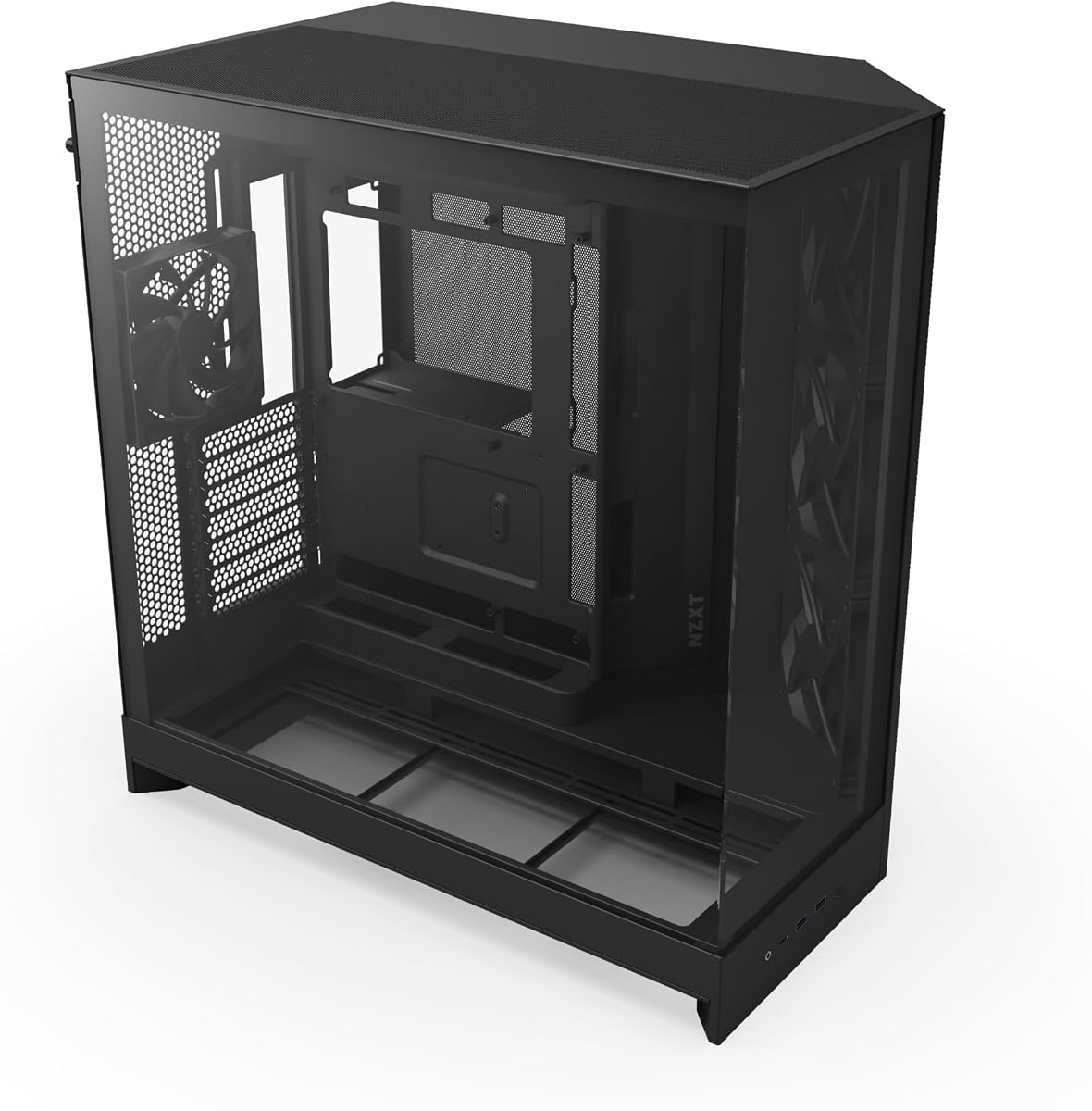


The NZXT H6 Flow stands out as a premier choice for builders seeking thermal efficiency without compromising on style. It offers a robust dual chamber layout that effectively isolates heat sources from your power supply. This design ensures your critical components remain cool even during intensive gaming sessions or rendering tasks.
We may earn a commission when you buy through this link, at no additional cost to you.
Its standout feature is the wraparound glass which provides an unobstructed view of your internal components. The top and side panels feature an optimized perforation pattern that enhances overall performance while filtering dust efficiently. The three pre-installed fans are positioned at an ideal angle to ensure superb cooling right out of the box.
While it lacks RGB lighting out of the box which is a trade-off for its clean aesthetic and superior cooling. The cable management system is intuitive and simplifies the build process significantly. This is a minor compromise for those who prioritize performance and a minimalist look over flashy lighting effects.
This case is perfect for enthusiasts who want a high-performance build with a focus on clean aesthetics. It suits those who value thermal efficiency and a sleek look above all else. We highly recommend it for anyone building a modern gaming PC today.
The dual chamber design separates heat generating components for improved cooling performance and system longevity.
Wraparound glass panels with a seamless edge provide a stunning and uninterrupted view of your build.
We may earn a commission when you buy through this link, at no additional cost to you.
The Thermaltake View 380 TG offers exceptional value for those seeking a modern dual chamber experience on a budget. It features a pillarless glass design that delivers a stunning unobstructed view of your components. This case supports hidden connector motherboards making it future-proof for evolving standards.
We may earn a commission when you buy through this link, at no additional cost to you.
It comes with four hydraulic bearing ARGB fans pre-installed which is a significant bonus for this price point. The I/O ports include a Gen 2 USB 3.2 Type-C ensuring modern connectivity options are available. The dual tempered glass panels are robust and offer good sound insulation for a quiet environment.
Cable routing can be slightly basic compared to premium models which might challenge first-time builders. The glass panels are also prone to fingerprints requiring frequent cleaning to maintain a pristine look. These drawbacks are minor given the excellent feature set and warranty coverage provided.
This case is ideal for budget conscious builders who still want a premium look and modern features. It fits those who appreciate ARGB lighting and a clean view of their hardware. We recommend it as the best value option in this category today.
Support for hidden connector motherboards ensures compatibility with next-gen cable management standards.
The pillarless front and side panels maximize visibility without structural interruptions.
We may earn a commission when you buy through this link, at no additional cost to you.
The HAVN HS 420 represents the pinnacle of dual chamber design offering unmatched flexibility and cooling power. Its hybrid structure is specifically engineered to direct cool air from the bottom intake onto the GPU. This ensures your graphics card receives optimal cooling during demanding tasks.
We may earn a commission when you buy through this link, at no additional cost to you.
It supports up to eleven 140mm fans which is a massive capacity for enthusiasts. The SimpliCable routing system with top-to-bottom grooved guides ensures your cables stay hidden and organized. A VESA display mount is included allowing you to attach a small screen for system monitoring directly to the case.
The high price point may be prohibitive for casual users seeking basic functionality. Assembly can also be complex due to the sheer number of options and mounting points available. However for enthusiasts willing to invest these trade-offs are well worth the premium experience.
This case is perfect for power users who demand the absolute best in cooling and customization. It suits those who want a clean look with maximum hardware compatibility. We recommend it as the top choice for high-end custom builds.
Flexible space fits combinations of storage fans radiators and displays to suit any setup.
Balanced airflow design ensures cool air reaches critical components efficiently.
We may earn a commission when you buy through this link, at no additional cost to you.
The NZXT H9 Flow is a spacious full tower designed for builders who need ample room for large components. Its dual chamber design separates main components from the power supply for improved thermal performance. This layout helps keep your cables organized and your system running cool under load.
We may earn a commission when you buy through this link, at no additional cost to you.
It includes three fans pre-installed and supports up to nine fans across various slots. The perforated steel panels ensure efficient cooling for high-performance builds. The back-connect ready feature makes it compatible with modern motherboards for a cable-free look.
The large footprint may not fit smaller desks or limited spaces. It does not include a fan controller which means you will need to manage lighting manually. These are minor issues given the overall high quality and build standard of the case.
This case is ideal for enthusiasts building a top-tier system with maximum expansion needs. It suits those who prioritize airflow and cable management above all else. We recommend it for anyone needing a large high-performance chassis.
Perforated panels and angled fans ensure efficient cooling for high-performance builds.
The back-connect ready design allows for a cable-free look with compatible boards.
We may earn a commission when you buy through this link, at no additional cost to you.
The H1 HYXN ATX offers a compelling package for those wanting maximum visual impact on a budget. It features a panoramic 270 degree wide-angle view which showcases your build beautifully. The pre-installed seven PWM ARGB fans provide immediate lighting and cooling without extra purchases.
We may earn a commission when you buy through this link, at no additional cost to you.
It supports up to three 360mm radiators simultaneously allowing for robust liquid cooling. The vertical airflow design uses dust filters at the bottom and top to reduce dust accumulation. The Type-C 3.0 port on the I/O panel ensures modern connectivity for peripherals.
The brand may be less recognized than established competitors which can raise concerns. The daisy chain fan setup works well but lacks a dedicated hub for centralized control. These issues are acceptable given the generous feature set and price point.
This case is perfect for gamers who want RGB lighting and a wide view. It suits budget builders who need high fan count out of the box. We recommend it for those prioritizing aesthetics and value.
Two transparent tempered glass panels transmit light naturally for a stunning visual effect.
Vertical airflow design improves cooling performance and extends hardware service life.
We may earn a commission when you buy through this link, at no additional cost to you.
The H2 (2026) HYXN is a large dual chamber case designed for extreme hardware compatibility. It supports GPUs up to 455mm and radiators up to 420mm for serious liquid cooling setups. The eight pre-installed PWM ARGB fans provide ample cooling and lighting right out of the box.
We may earn a commission when you buy through this link, at no additional cost to you.
It features a Type-C 3.2 port on the front for high-speed data transfer. The extra-large rear compartment features built-in Velcro straps for tidier wiring. This ensures your cables are hidden away from the main display area.
The very large size may not fit in standard desk spaces. You may need to manage fan lighting manually as detailed controllers are not always included. These are minor concerns for those who need maximum internal volume and cooling.
This case is ideal for enthusiasts building a super-sized system with massive components. It suits those who prioritize cooling and connectivity over compactness. We recommend it for high-end extreme builds.
Supports GPUs up to 455mm and PSUs up to 220mm for extreme hardware.
Extra-large rear compartment ensures clean cable routing and a tidy look.
We may earn a commission when you buy through this link, at no additional cost to you.
The Antec C8 is a robust full tower designed for custom enthusiasts who want total control over their build. It features a dual chamber layout that separates heat zones for optimized performance. The seamless edge glass on the front and side provides a stunning full view of your components.
We may earn a commission when you buy through this link, at no additional cost to you.
It supports thick 360mm radiators on top bottom and side simultaneously for maximum cooling potential. The full cut-out at the bottom with interchangeable brackets adds flexibility to your fan setup. This allows you to tailor the airflow exactly how you want it.
The case does not include any fans which means you must purchase them separately. This increases the overall cost and requires careful selection of compatible sizes. However for purists this flexibility is a significant benefit for custom configurations.
This case is perfect for enthusiasts who want to customize every aspect of their cooling. It suits those who need E-ATX support and a clean glass look. We recommend it for advanced builders.
No included fans allow you to choose exactly the right hardware for your needs.
Full view glass with a seamless edge offers an unobstructed look at your build.
We may earn a commission when you buy through this link, at no additional cost to you.
The ASUS TUF Gaming GT502 is built for gamers who value durability and high performance. It features independent cooling zones for the CPU and GPU to manage heat efficiently. The tool-free side panels make it easy to access your components for upgrades or cleaning.
We may earn a commission when you buy through this link, at no additional cost to you.
A panoramic view with tinted glass provides a tactful aesthetic for your build. The USB 3.2 Gen 2 Type-C on the front panel ensures fast data transfer speeds. The included vertical GPU mount helps banish sag and adds a unique look.
The tinted glass limits visibility of your components compared to clear panels. This may be a concern for those who want to show off RGB lighting fully. The price is also higher than many other options in this category.
This case is ideal for gamers who need a rugged and stylish build. It suits those who prioritize connectivity and GPU support. We recommend it for high-performance gaming rigs.
Dual chambers allow you to configure independent cooling zones for CPU and GPU.
USB 3.2 Gen 2 Type-C ensures fast connectivity for modern peripherals.
We may earn a commission when you buy through this link, at no additional cost to you.
The darkFlash DY470 offers a distinctive design with a unique top-angled glass panel. This enhances aesthetic appeal and provides optimal visibility of your components. It supports ATX back-mounted motherboards ensuring a clean modern look.
We may earn a commission when you buy through this link, at no additional cost to you.
It includes four PWM ARGB fans and supports GPUs up to 410mm for ample space. The snap-on design and velcro straps make installation and cable management hassle-free. The dust filter at the bottom helps reduce dust and keep components clean.
The controller for lighting is not included which is a missing convenience. Airflow options are limited compared to cases with more fan slots. These issues are minor given the unique look and spacious interior.
This case is perfect for those seeking a unique design to stand out. It suits gamers who want a premium look without excessive cost. We recommend it for stylish gaming builds.
The unique top-angled glass design creates a stunning centerpiece in any room.
Snap-on design and velcro straps simplify installation and keep cables tidy.
We may earn a commission when you buy through this link, at no additional cost to you.
The MONTECH King 95 PRO features a stunning curved tempered glass on front and side. This design opens a wide view of the interior for a unique modern look. It includes six pre-installed fans and a 10-port controller for full lighting control.
We may earn a commission when you buy through this link, at no additional cost to you.
The quick-release panels allow for access without a screwdriver for convenience. The dual-chamber layout keeps cabling out of the main compartment for a clean look. It supports high-end hardware including GPUs up to 420mm.
The curved glass may cost more than flat alternatives but offers a unique style. The weight is higher due to the glass panels so ensure your stand can support it. These are acceptable trade-offs for the aesthetic benefit.
This case is ideal for those wanting a modern curved look for their build. It suits enthusiasts who need robust cooling and lighting control. We recommend it for stylish high-performance rigs.
Curved tempered glass paired with metal panels opens a wide view of the interior.
Six fans and a 10-port controller provide complete lighting customization.
We may earn a commission when you buy through this link, at no additional cost to you.
Selecting the right dual chamber PC case requires considering several key factors to ensure performance and compatibility. Below are the most important aspects to evaluate before making your purchase.
Airflow is critical for maintaining stable temperatures. Look for cases with perforated panels and strategic vent placements to ensure heat is expelled efficiently.
Prioritize models with high fan capacity and mesh designs for optimal cooling.
Ensure the case supports your specific motherboard form factor and GPU length. Check the clearance for radiators and CPU coolers to avoid fit issues.
Always verify maximum dimensions against your hardware specifications before buying.
A good dual chamber case should hide wires effectively. Look for wide channels and straps that route cables behind the motherboard tray.
Effective management keeps your build clean and improves airflow for long term performance.
Materials matter for stability and durability. Choose cases with sturdy steel frames and tempered glass panels that resist cracking or shattering.
High quality construction ensures your case lasts and protects your expensive components.
Choose a design that matches your style. Some cases feature panoramic glass while others may use tinted panels or unique angles.
The best case complements your components and fits your room layout seamlessly.
Check if the case comes with pre-installed fans to save money and time. Having a mix of intake and exhaust fans helps balance internal pressure.
Avoid cases with no fans unless you plan to buy high quality aftermarket ones.
Modern cases should include USB 3.2 or Type-C ports for fast data transfer. Ensure the front panel provides the connections you need for peripherals.
Select a case that supports the latest standards to future proof your setup.
Balance features with your budget. A mid range case often offers the best value compared to expensive premium models.
Determine which features matter most and allocate your budget accordingly.
Proper installation starts with reading the manual to understand the layout. Mount your motherboard first and route cables through the dual chamber before powering up.
Clean the dust filters regularly to maintain optimal airflow. Remove the panels gently to avoid damaging the glass or the frame.
Monitor your temperatures after building to ensure cooling zones are working correctly. Adjust fan speeds or radiator placement if needed for peak performance.
A dual chamber PC case separates your power supply and drives from your main components. This improves cooling efficiency by reducing heat transfer and helps manage cables for a cleaner look.
Most modern dual chamber cases support long GPUs with high clearance. Always check the maximum GPU length listed in the specifications before purchasing.
Many new dual chamber cases are back-connect ready. Ensure the specific model you choose supports your motherboard standard for a cable-free aesthetic.
You should clean dust filters every two months or as needed. Regular cleaning ensures proper airflow and prevents dust from accumulating inside the chassis.
Use front and bottom fans for intake and top and rear fans for exhaust. This creates a positive pressure that pushes heat out effectively.
Tempered glass is highly durable and safe. Just avoid hitting edges or corners with heavy objects to prevent accidental breakage.
We have reviewed ten exceptional models ranging from budget friendly to premium choices. The NZXT H6 Flow and HAVN HS 420 stand out for their performance and design.
Prioritize airflow and component compatibility to ensure your build runs smoothly. The right case will protect your hardware and enhance your visual experience.
Always check current prices and stock before purchasing to get the best deal. Your perfect case awaits you for the ultimate custom build.