
UBIQUITI UniFi Aggregation Switch Pro
4.5Editor score
4 x 25G SFP28 ports
28 x 10G SFP+ ports
Layer 3 managed features
This guide compares the top 25GbE Switches with SFP28 Ports for data centers and enterprise networks, evaluating performance, features, and compatibility.
High-speed networking is essential for modern data centers and enterprise environments. A reliable switch with 25GbE capabilities ensures smooth data flow and supports demanding workloads like AI and cloud computing efficiently.
We analyzed ten top-rated switches to find the best options for 25GbE connectivity. Our comparison focuses on port configurations, management features, throughput, and real-world performance metrics for diverse IT needs.
Each selection highlights key strengths and potential limitations for specific use cases. Prices and availability may change, so verify current details before purchasing to ensure you get the right hardware for your infrastructure.
4.5Editor score

4.8Editor score

4.6Editor score
This side-by-side comparison evaluates ten leading switches designed for 25GbE connectivity. We compare port counts, switching capacities, management capabilities, and physical specifications to help you choose the right model for your network infrastructure needs.




This Cisco Nexus switch offers 48 ports of 25GbE connectivity ideal for dense server racks. As a renewed unit it provides enterprise grade performance at a reduced cost for budget conscious IT managers.
We may earn a commission when you buy through this link, at no additional cost to you.
The architecture supports high throughput workloads with low latency switching. Uplinks via QSFP28 allow for 100G aggregation ensuring no bottlenecks as your network scales up over time.
Buying renewed means the unit was inspected but may lack full manufacturer warranty. However for lab or internal networks the risk is acceptable given the significant price advantage over new units.
Ideal for data centers needing bulk 25GbE ports without the new hardware cost. Choose this if you require Cisco NX-OS features and have reliable support or existing maintenance contracts.
48 SFP28 ports allow massive server connections in a single 1U chassis.
6 QSFP28 ports support 40G or 100G aggregation for future proofing.
We may earn a commission when you buy through this link, at no additional cost to you.
The MikroTik CRS520 delivers extreme performance with 28 ports of 25GbE and 4 of 100G. It targets advanced users needing programmable hardware and deep network control via RouterOS.
We may earn a commission when you buy through this link, at no additional cost to you.
With a quad-core CPU and 4GB RAM it handles routing policies and traffic shaping efficiently. The switching capacity exceeds what most enterprise workloads require today ensuring longevity.
This switch is not for beginners; it demands knowledge of MikroTik software. The price point is premium reflecting the raw power and flexibility you gain for custom network architectures.
Buy this for high-performance computing or ISP edge routing where flexibility matters. It is perfect if you want to define custom pipelines and require significant uplink bandwidth.
Powerful CPU allows complex routing and filtering tasks directly on the switch.
Four QSFP28 ports provide 100G links for core network aggregation.
We may earn a commission when you buy through this link, at no additional cost to you.
Ubiquiti offers this switch to bridge 10G and 25G networks seamlessly. It includes 28 SFP+ ports and 4 SFP28 ports supporting Layer 3 features for smart traffic management.
We may earn a commission when you buy through this link, at no additional cost to you.
The UniFi controller makes management easy for existing users. You can route traffic between VLANs directly on the switch reducing server load. The touchscreen helps quick monitoring without login.
Note that only four ports run at 25G; the rest are 10G. For small to mid enterprises needing some 25G this is a cost effective way to start scaling uplinks.
Choose this if you already use UniFi or want an easy managed switch. It fits well in SMB setups needing better performance without complex CLI configurations.
Built-in routing helps optimize traffic flow across different network segments.
UniFi interface and touchscreen make setup and monitoring very user friendly.
We may earn a commission when you buy through this link, at no additional cost to you.
This QNAP switch supports 25GbE 10GbE and 100G uplinks on one unit. It targets storage and virtualization needs with lossless flow control to protect data integrity during transfers.
We may earn a commission when you buy through this link, at no additional cost to you.
The 24 copper ports let you connect existing servers while adding four 25G SFP28 ports for faster uplinks. It handles large NAS deployments well with QoS and VLAN support.
It is labeled as Lite Managed meaning advanced routing is limited. Still for a storage focused setup the built-in features suffice. The price is higher reflecting the specialized port mix.
Buy this if your main goal is high-speed storage or virtualization. It fits storage clusters needing fast 25G links and robust copper connectivity without needing complex routing.
Lossless network features like PFC help prevent data packet drops during transfers.
Mix of RJ45 and fiber ports adapts to varied existing infrastructure needs.
We may earn a commission when you buy through this link, at no additional cost to you.
Dell EMC offers a switch that blends PoE++ for devices with high-speed 25G fiber uplinks. It serves campus networks where access points and cameras need power plus fast data links.
We may earn a commission when you buy through this link, at no additional cost to you.
The switch supports 100G QSFP28 for core connections ensuring your uplinks match growing backbone speeds. Modular design allows flexible configurations to fit changing IT requirements easily.
High power consumption is a trade-off for the PoE++ and high-speed support. Ensure your rack has adequate cooling and power supply. It is a robust solution for dense wired networks.
Ideal for campuses needing power delivery and high-speed aggregation. Choose this if you have many PoE devices and need to connect them to a fast 25G or 100G core.
Supports higher power per port for advanced devices and heating elements.
100G uplinks prevent bottlenecks when aggregating many high-speed access ports.
We may earn a commission when you buy through this link, at no additional cost to you.
The Nexus 93180YC-EX is a powerful data center switch with 48 25GbE ports and six 100G uplinks. As a renewed unit it offers high performance for labs or internal testing environments.
We may earn a commission when you buy through this link, at no additional cost to you.
Cut-through switching minimizes latency for time sensitive applications. VXLAN support enables virtualization and ACI allows simplified automation. Hot-swappable parts ensure maintenance without downtime.
Renewed items vary in physical condition but function fully. Verify the warranty details from the seller before buying. This model excels where density and routing capabilities are top priorities.
Use this for data center aggregation where ACI or virtualization is needed. It suits technical teams needing proven Cisco hardware at a fraction of new market pricing.
VXLAN support makes it easy to build scalable and isolated network environments.
Cut-through switching ensures minimal delay for critical high-speed workloads.
We may earn a commission when you buy through this link, at no additional cost to you.
TRENDnet offers this switch with 24 2.5G copper ports and 10G uplinks. While not 25GbE native it serves businesses upgrading from 1G to multi-gig speeds without new cabling.
We may earn a commission when you buy through this link, at no additional cost to you.
Four SFP+ ports provide fast uplinks to 25G or 10G gear. The lifetime protection plan adds peace of mind for small office deployments. It is cost effective and easy to manage.
Though it lacks 25G ports it connects to higher speeds via SFP+ modules. For teams wanting multi-gig access today and uplinks tomorrow this is a practical stepping stone.
Choose this for SMBs upgrading bandwidth needs. If you need 25G eventually pair it with a 25G capable switch via the SFP+ ports for a smooth transition.
2.5G ports deliver higher speeds over existing cabling without extra cost.
Protection plan adds value for small businesses without dedicated IT staff.
We may earn a commission when you buy through this link, at no additional cost to you.
This TRENDnet switch is a web managed unit with 2.5G and 10G ports. It provides basic VLAN and QoS controls suitable for businesses needing more than unmanaged gear.
We may earn a commission when you buy through this link, at no additional cost to you.
Web management simplifies setup for small teams without CLI expertise. Hive cloud service allows remote monitoring though fees may apply. It works well for general office needs.
Like its sibling it lacks 25GbE but supports 10G uplinks. It fits environments where web-based control is preferred but deep analytics are not required.
Buy for offices upgrading from 1G needing basic smart features. It bridges the gap between unmanaged and enterprise managed switches at an accessible price.
GUI interface lets users configure VLANs and QoS without command line.
Hive service offers remote insights for teams not always on site.
We may earn a commission when you buy through this link, at no additional cost to you.
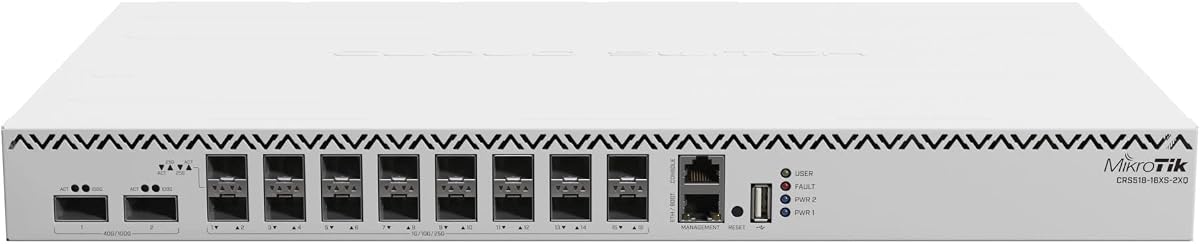
The CRS518 provides 16 ports of 25GbE with 100G uplinks. It is a compact option for edge or lab environments needing serious speed without bulk.
We may earn a commission when you buy through this link, at no additional cost to you.
MikroTik software enables detailed routing and firewall rules. The unit is cost effective for the port density you get. Ideal for enthusiasts or small data centers.
While powerful it still requires technical knowledge to configure fully. Ensure you understand RouterOS capabilities before deployment. It is a flexible choice for tailored network needs.
Choose this for labs or edge nodes needing 25G access. It fits when you want to build a custom routing topology at low cost.
Smaller chassis saves rack space while delivering high-speed port density.
Full RouterOS suite allows deep control over packet flow and policies.
We may earn a commission when you buy through this link, at no additional cost to you.
D-Link provides a fanless managed switch with Gigabit and SFP ports. It is silent and energy efficient making it ideal for quiet offices or retail spaces.
We may earn a commission when you buy through this link, at no additional cost to you.
Web UI simplifies setup for basic VLANs and ACLs. Lifetime warranty offers long term security. NDAA compliance makes it suitable for government related projects.
This unit does not support 25GbE speeds but offers solid L2+ features. If your needs are Gigabit with some fiber uplinks it is a reliable and quiet choice.
Select for silent environments needing basic management. It is not for high 25G workloads but works well for general office connectivity.
Fanless design ensures zero noise for noise-sensitive spaces.
Meets regulatory standards for security and government projects.
We may earn a commission when you buy through this link, at no additional cost to you.
Selecting a switch with 25GbE SFP28 ports requires understanding your network needs. Consider port count, switching capacity, and management features to match your environment.
Ensure the switch has enough 25GbE ports for your servers. Some units offer only four ports while others provide forty eight for larger deployments.
Match the ports to your current cabling and server NICs to avoid compatibility issues or costly adapter purchases.
Uplinks via QSFP28 or SFP+ must match your core network speed. Look for 100G uplinks if you plan to scale beyond current limits.
Fiber uplinks prevent bottlenecks when multiple 25G servers send data to storage or the internet simultaneously.
Switching capacity defines total data throughput. Aim for non-blocking capacity to ensure all ports can run at full speed.
Higher capacity guarantees stable performance during peak loads without dropped packets or latency spikes.
Decide between managed and unmanaged switches. Managed units support VLANs QoS and routing needed for segmentation.
Layer 3 management allows internal routing reducing traffic to external routers and improving efficiency.
High speed switches consume more power and heat. Ensure your rack has adequate power and ventilation or consider fanless models for quiet spaces.
Check power supply options and redundancy needs to maintain uptime during power issues or failures.
Consider vendor lock-in and support. Some brands integrate with controllers or monitoring tools you already use.
Open standards and CLI access help if you prefer custom scripts or multi-vendor environments.
Renewed switches lower costs but vary in warranty. New units offer full support and latest firmware out of the box.
Balance cost savings with risk tolerance based on whether the switch is for production or lab use.
Choose a switch with spare ports or modular design to accommodate growth. This avoids replacing hardware soon after purchase.
Look for models supporting future upgrades like 100G ports to extend the investment life.
Install the switch in a ventilated rack with proper airflow. Connect 25GbE transceivers to SFP28 ports and ensure compatible cables are used for fiber optics.
Access the management interface via web browser or CLI to configure VLANs and routing. Update firmware regularly to maintain security and performance.
Monitor port statistics to detect errors or congestion. Clean fiber connectors periodically to prevent signal loss and maintain optimal throughput.
Many SFP28 ports are backward compatible with 10G SFP+ transceivers. However not all vendors allow mixing speeds on the same port group so check the manual before connecting 10G devices.
You will need SFP28 compatible transceivers and either DAC cables for short distances or OM3 OM4 fiber for longer runs. Use quality cables to ensure stable signal quality.
Yes for enthusiasts and professionals running homelabs these switches offer great speed. However they may be expensive and require technical knowledge to set up.
Most enterprise switches use industry standards like Ethernet and VLANs so they work with non-Cisco gear. Avoid proprietary features like Cisco ACI if you mix vendors.
Yes you need NICs supporting 25GbE SFP28. Older 10G cards will not reach full speed and may require adapters reducing performance.
SFP28 ports run at 25G each and QSFP28 ports aggregate 100G. QSFP28 is used for uplinks while SFP28 connects individual servers or devices.
Renewed units are inspected and tested by vendors. They often function like new but may lack full manufacturer warranties so choose trusted sellers.
Most have web GUIs or command line interfaces. Some integrate with cloud or controller software for centralized management. Check documentation for login details.
We reviewed ten switches offering 25GbE SFP28 ports suited for data centers and labs. The Cisco Nexus units excel in density while MikroTik offers powerful custom routing.
Prioritize port count uplink speeds and management features based on your specific workflow. Ensure compatibility with existing NICs and fiber standards.
Prices and stock change frequently so confirm current details before buying. Choose the model that balances performance and cost for your unique needs.