
Razer Huntsman V3 HE Magnetic Mini
3.9Editor score
8000Hz polling rate
Magnetic switches
Rapid trigger support
Discover the top 65 percent keyboards for gaming in October 2026. We compare features, switch types, and layouts to help you find the perfect compact board.
Finding the right gaming keyboard can transform your setup. The 65 percent form factor offers a perfect balance between compact design and essential functionality. Gamers love this layout for the extra mouse space while retaining arrow keys and navigation clusters.
This guide compares ten top-rated 65 percent keyboards available today. We evaluated build quality, switch types, customization options, and connectivity. Our goal is to help you choose a board that fits your budget and gaming style without sacrificing performance.
Each pick highlights unique strengths and ideal use cases. Some excel in wireless flexibility, others in customization or raw speed. Keep in mind that stock levels and pricing may fluctuate. Always check current availability before making your final decision.
3.9Editor score

4.5Editor score
4.6Editor score
The following table provides a side by side overview of all ten keyboards. We highlight key specifications like connectivity, layout, and switch types. This helps you quickly identify which model aligns best with your specific needs and preferences.



The RK ROYAL KLUDGE R65 stands out as a top pick for enthusiasts. It offers a gasket mount design that improves typing feel. The included cream switches provide a smooth and quiet experience right out of the box.
We may earn a commission when you buy through this link, at no additional cost to you.
Its QMK VIA support allows deep customization of keymaps. You can remap keys without needing advanced coding skills. The aluminum volume knob adds a premium touch and enhances daily usability significantly.
While it lacks wireless connectivity, the wired stability is perfect for gaming. Some users might find the software setup slightly complex at first. However, the benefits of full programmability outweigh this initial hurdle.
This keyboard is ideal for those wanting a premium feel without the highest price. It balances performance and value exceptionally well. If you want a customizable and well built board, this is a strong choice.
The gasket mount and poron layers reduce vibration. This creates a thocky sound preferred by typing enthusiasts.
With QMK and VIA, you can tailor every key. This flexibility extends the keyboard lifespan as needs change.
We may earn a commission when you buy through this link, at no additional cost to you.
This model represents the cutting edge of gaming keyboard technology. The magnetic switches offer adjustable actuation points. This allows players to fine tune sensitivity for different games and personal preferences.
We may earn a commission when you buy through this link, at no additional cost to you.
The 8000Hz polling rate ensures near zero latency. It is a significant upgrade for competitive players. Snap tap technology enables faster movement inputs in FPS titles.
The main drawback is the premium price. It targets serious gamers who need every advantage. Casual users may not notice the difference over standard mechanical keyboards.
If you compete in esports or want the fastest response possible, this is the ultimate choice. The build quality supports heavy daily use. It justifies the cost for performance focused gamers.
You can set actuation from 0.1mm to 4mm. This lets you prevent accidental presses or boost speed.
Snap tap prioritizes the last input for two keys. This aids in rapid counter strafing without setup.
We may earn a commission when you buy through this link, at no additional cost to you.
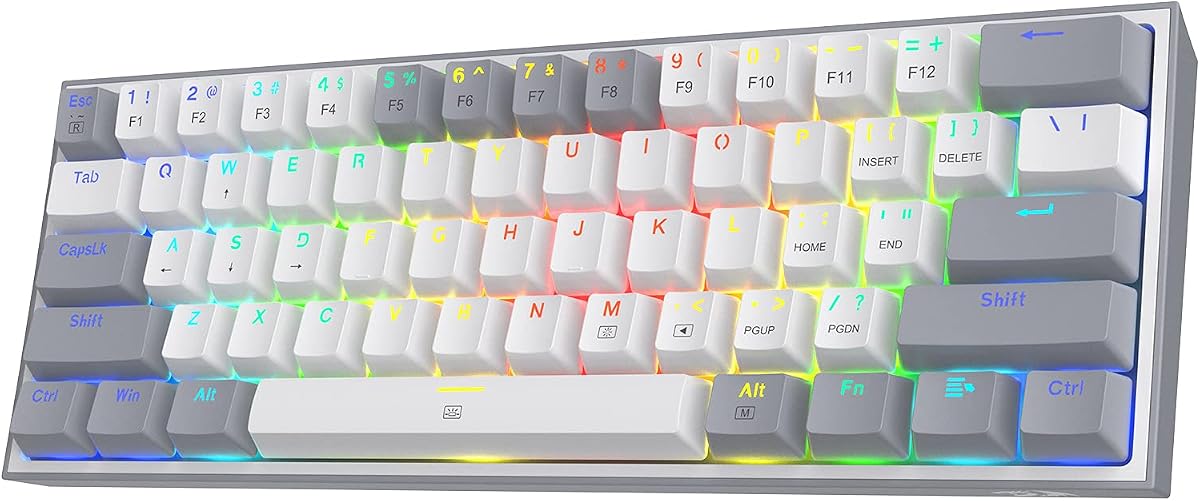
The Redragon K617 offers exceptional value for gamers on a budget. It includes hot swap sockets, allowing easy switch upgrades. This is rare at this price point and adds long term value.
We may earn a commission when you buy through this link, at no additional cost to you.
Its compact layout saves desk space for mouse movement. The RGB lighting is vibrant and customizable through software. Despite the low cost, the build feels sturdy enough for daily gaming.
Some compromises include the plastic case and simpler software. You might need to update firmware or third party tools for deep customization. These are minor issues given the low price tag.
This board is perfect for entry level users or secondary setups. It proves you do not need to spend a fortune for quality. It is a highly recommended starting point for mechanical keyboards.
Hot swap support means you can upgrade later. This saves money as your preferences evolve.
The compact layout maximizes mouse room. Ideal for low DPI players needing accuracy.
We may earn a commission when you buy through this link, at no additional cost to you.
The RK65 combines wireless freedom with a tactile feel. Its gasket mount provides a unique typing experience. The included volume knob adds convenience for media control during sessions.
We may earn a commission when you buy through this link, at no additional cost to you.
Battery life is impressive, lasting hundreds of hours. You can switch between devices easily for multitasking. The design is sleek and fits well in modern setups.
Using RGB constantly will reduce battery duration. Also, wireless charging cases are not included. These are small trade-offs for the freedom of a cord free setup.
This keyboard suits users who want a clean desk. It works great for both work and play. If you need wireless flexibility, this is a top contender.
Dual mode supports Bluetooth and 2.4G. You can switch devices quickly for productivity.
Gasket mount adds bounce and sound. It feels more premium than standard mounts.
We may earn a commission when you buy through this link, at no additional cost to you.
The HyperX Origins 2 65 is built for personalization. You can swap the housing without tools to change colors. This allows you to refresh your desk aesthetic easily.
We may earn a commission when you buy through this link, at no additional cost to you.
Its high profile design mimics original mechanical styles. The 8K polling rate ensures fast response times. It is solid for competitive gaming scenarios.
High profile keys might feel tall for some users. You may need a wrist rest for comfort. Also, the lack of wireless limits mobility compared to others.
This model is great for gamers who value style. It balances classic feel with modern tech. If you want a colorful and reliable board, consider this option.
Change colors with a simple drop in. This makes customization accessible to everyone.
Updates every 0.1ms for precise inputs. Reduces input lag in fast games.
We may earn a commission when you buy through this link, at no additional cost to you.
The RK68 excels at connecting multiple devices. You can toggle between three systems quickly. It is ideal for users with mixed OS setups.
We may earn a commission when you buy through this link, at no additional cost to you.
It features a hot swap PCB for easy customization. The battery life supports extended wireless sessions. Its compact size makes it perfect for travel.
The single blue backlight lacks full color RGB. Also, software features are basic compared to others. These are minor issues for a budget wireless option.
This keyboard is a solid choice for productivity. It handles work and gaming well. If you need multi device support, it is highly effective.
Switch devices via simple key combos. This boosts workflow efficiency significantly.
Compact size fits easily in bags. Great for LAN parties or remote work.
We may earn a commission when you buy through this link, at no additional cost to you.
The Falchion Ace includes a unique touch panel. You can control volume or macros without pressing keys. This adds a modern and intuitive control layer.
We may earn a commission when you buy through this link, at no additional cost to you.
ROG NX switches are tuned for smoothness. The PBT keycaps ensure durability over time. It feels premium and robust in hand.
Wireless connectivity is not supported on this model. It is heavier than some competitors. However, the tactile feedback and build quality are exceptional.
This board fits gamers who want unique features. The touch panel sets it apart. If you value innovative controls, it is worth the investment.
Adjust volume or macros via touch. It offers a different way to interact.
Tuned for smooth actuation. Reduces noise and spring bounce effectively.
We may earn a commission when you buy through this link, at no additional cost to you.
The MK Box is a tiny and budget friendly option. It keeps arrow keys despite its small size. Blue switches provide loud and satisfying feedback for typing.
We may earn a commission when you buy through this link, at no additional cost to you.
It is plug and play with no drivers needed. The LED backlight is simple but functional. It is perfect for students or secondary desks.
RGB lighting is not available on this model. The build is mostly plastic. These are expected limitations for a low cost compact board.
Ideal for beginners who want clicky switches. It offers a full function set in a small package. If you need a cheap portable keyboard, it works well.
Blue switches provide loud feedback. Good for tactile typing enthusiasts.
Low price without sacrificing keys. Ideal for entry level mechanical users.
We may earn a commission when you buy through this link, at no additional cost to you.
The F65 is designed for acoustic excellence. It uses five layers of dampening for a deep sound. The gasket mount enhances this effect significantly.
We may earn a commission when you buy through this link, at no additional cost to you.
A massive 4000mAh battery ensures long wireless use. South facing RGB supports better keycaps. It offers three connectivity options for flexibility.
Software is not as advanced as others. Customization may require third party tools. However, the sound quality is top tier for the price.
This board suits enthusiasts who love specific sounds. It delivers a premium experience without high cost. If sound is your priority, it stands out.
Five layers of foam reduce noise. Creates a deep thocky sound naturally.
LEDs face down to reduce clash. Compatible with most custom keycap profiles.
We may earn a commission when you buy through this link, at no additional cost to you.
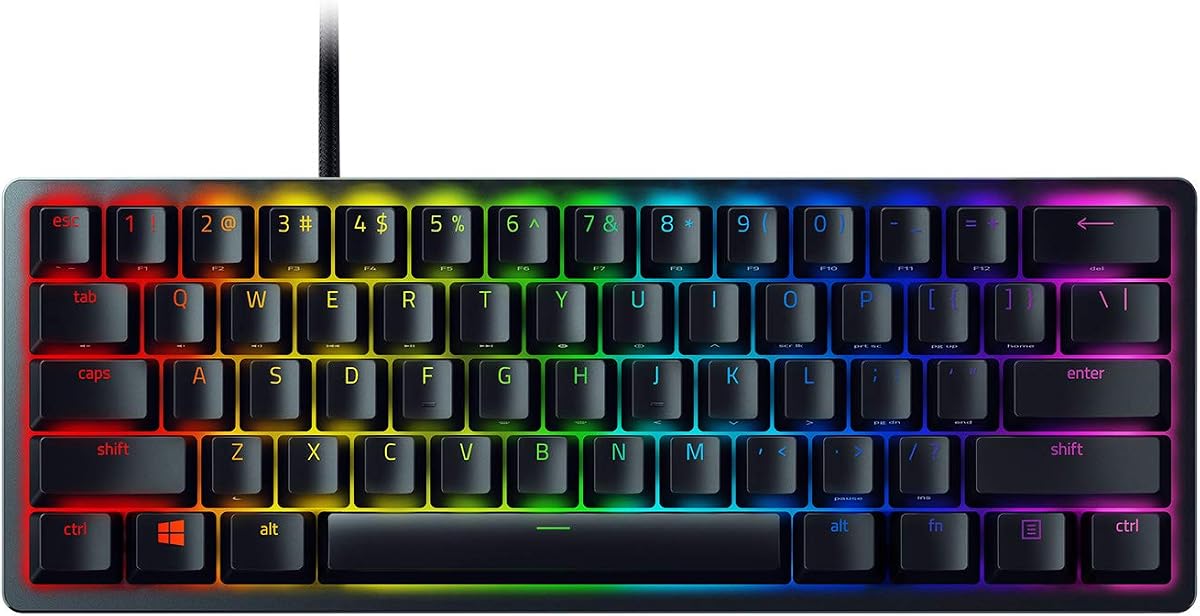
The Huntsman Mini uses optical switches for speed. It registers inputs via light beams for less wear. This makes it durable and fast for gaming.
We may earn a commission when you buy through this link, at no additional cost to you.
Chroma RGB syncs with many games and devices. The aluminum frame adds structural strength. It supports Razer Synapse for deep customization.
It lacks arrow keys, relying on layers. Some users prefer 65% for navigation. Also, full features need Razer software.
Best for FPS gamers wanting speed and sync. It offers high performance in a tiny package. If you like Razer ecosystems, this is a top pick.
Light based actuation reduces latency. Ideal for fast competitive play.
RGB works with Philips Hue and more. Creates a unified gaming setup.
We may earn a commission when you buy through this link, at no additional cost to you.
Choosing a 65 percent keyboard involves balancing size, features, and budget. This guide explains the key factors to consider before you buy.
The 65 percent layout typically includes 65 to 68 keys. It retains arrow keys and essential navigation. This balance helps gaming without sacrificing desk space.
Look for dedicated arrow keys if you often use them. This avoids relying on complex key combos.
Mechanical switches come in linear, tactile, and clicky types. Linear switches are smooth and quiet for gaming. Clicky switches offer loud feedback preferred for typing.
Test switch types before buying to find what feels best. Switches can affect fatigue during long sessions.
Wired keyboards offer the lowest latency. Wireless models provide a clean setup but may add latency. Hybrid models offer both options for flexibility.
Choose wired for competitive play and wireless for work. Ensure wireless models have stable Bluetooth or 2.4G support.
Software allows you to remap keys and create macros. QMK VIA support provides deep open source customization. RGB settings let you customize colors and effects.
Check if the software supports your operating system. Customization is key for tailoring the keyboard to your needs.
Material matters for durability and feel. Aluminum cases are sturdier than plastic. Gasket mounts offer a more premium typing experience.
Look for robust construction to withstand daily use. Quality materials ensure the keyboard lasts longer over time.
PBT keycaps are durable and resist shine. ABS caps are smoother but wear faster over time. Double shot legends ensure text stays visible.
Prioritize PBT keycaps for longevity. This reduces the need for replacements down the line.
Polling rate determines how often the keyboard reports input. 1000Hz is standard, but 4000Hz or higher offers faster response. This matters in competitive scenarios.
Choose higher polling rates for fast paced games. It ensures your inputs register instantly.
Prices range from budget to premium tiers. Entry boards offer basic features, while pro boards add customization. Determine your budget to find the best value.
Don't overspend on features you won't use. Balance cost with your specific needs.
Proper maintenance extends the lifespan of your mechanical keyboard. Keep it free of dust and debris using a soft brush or compressed air. Clean spills immediately to avoid damage to internal components.
Use the provided software to configure keybindings. This allows you to map essential actions without relying on complex macros. Regularly update firmware to ensure optimal performance.
Store the keyboard safely when traveling to prevent keycap damage. Using a sleeve or hard case protects the keys from scratches. This keeps your setup ready for any gaming session.
Yes, a 65 percent keyboard is excellent for gaming. It saves desk space while keeping arrow keys for navigation. This balance helps with mouse movement and essential controls during matches.
Gasket mounts provide a softer typing feel and reduce noise. They use rubber or foam layers between the plate and case. This improves comfort and sound quality for long sessions.
Modern wireless keyboards with 2.4GHz dongles have minimal lag. They are often as fast as wired ones. However, Bluetooth modes may have slight delay for competitive play.
Use compressed air to remove dust between keys. A soft brush can clear crumbs from crevices. Avoid spraying liquids directly on the board to prevent damage.
Hot swapping allows you to change switches without soldering. It uses sockets that hold the switch pins. This makes customization easy for users who want to experiment.
Yes, PBT keycaps are more durable and resist shine. They have a textured finish that lasts longer. ABS caps tend to wear down and become smooth over time.
We have reviewed ten excellent 65 percent keyboards suitable for gaming. From budget options to high performance models, there is something for everyone. The RK ROYAL KLUDGE R65 offers the best overall balance of features and cost.
When making your choice, prioritize the features that matter most to you. Wireless connectivity, switch type, and build quality are key considerations. Align these with your budget and gaming style.
Remember that prices and availability can change over time. Always check current listings before making your purchase. This ensures you get the best deal and the right product for your needs.