
Corded Landline for Seniors
4.2Editor score
Big picture buttons
110dB loud ringer
No battery required
This guide compares the best captioned telephone options for seniors and hard of hearing users, highlighting real time captions and amplified sound features.
Captioned telephones provide a vital bridge for seniors and individuals with hearing loss to stay connected. These devices display real time text alongside audio, ensuring conversations are clear and confident without missing important details during every call.
We evaluated ten top rated models based on caption accuracy, sound amplification, ease of use, and reliability. Our comparison covers traditional landline options, VoIP compatible units, and specialized devices designed for dementia care and visual impairments alike.
Each pick highlights specific strengths like large buttons, voice commands, or photo dialing to match diverse needs. Prices and availability change frequently, so please verify current details before purchasing to ensure you select the right solution for your home setup.
4.2Editor score

4.3Editor score
4.5Editor score
This side by side comparison reviews all ten selected models to help you find the perfect captioned telephone for your specific hearing needs and home environment requirements.


The Hamilton CapTel 2400iSPNBT stands out as the top choice for captioned telephones. It features a large touchscreen that displays real time captions allowing users to listen and read simultaneously for clear confident conversations.
We may earn a commission when you buy through this link, at no additional cost to you.
This device offers both auto and assisted captioning options ensuring you never miss a word. With amplified sound up to 40dB and hearing aid compatibility it caters to various levels of hearing loss effectively.
While it requires high speed internet and US registration the service is free. Some users may find the setup slightly involved compared to traditional phones but the clarity gained is worth the initial effort.
Anyone needing reliable real time text support for phone calls will benefit most from this model. It is ideal for seniors who want to stay connected without straining to hear every detail clearly.
The captions appear instantly on the large screen ensuring you follow every word of the conversation accurately.
Adjustable tone and caption size options let you personalize the experience for maximum comfort during calls.
We may earn a commission when you buy through this link, at no additional cost to you.
This corded landline phone offers an affordable solution for seniors with memory or hearing challenges. While it lacks advanced captioning features its large photo buttons and loud ringer make it highly accessible for everyday use.
We may earn a commission when you buy through this link, at no additional cost to you.
It operates directly from the phone line without needing batteries or internet power which ensures reliability during outages. The SOS button and hands-free calling add safety and convenience for those with mobility issues.
The main trade-off is the absence of real time text captions found in other models. However for users who primarily need simple dialing and clear sound this device provides excellent value and ease of use.
Families looking for a straightforward phone for parents with dementia will find this very helpful. Its simplicity ensures that making calls remains effortless even when memory issues make dialing difficult.
Customizable photo buttons let seniors dial family members with one touch without memorizing complex numbers.
Powered by the phone line so it works even during power outages without requiring batteries or chargers.
We may earn a commission when you buy through this link, at no additional cost to you.
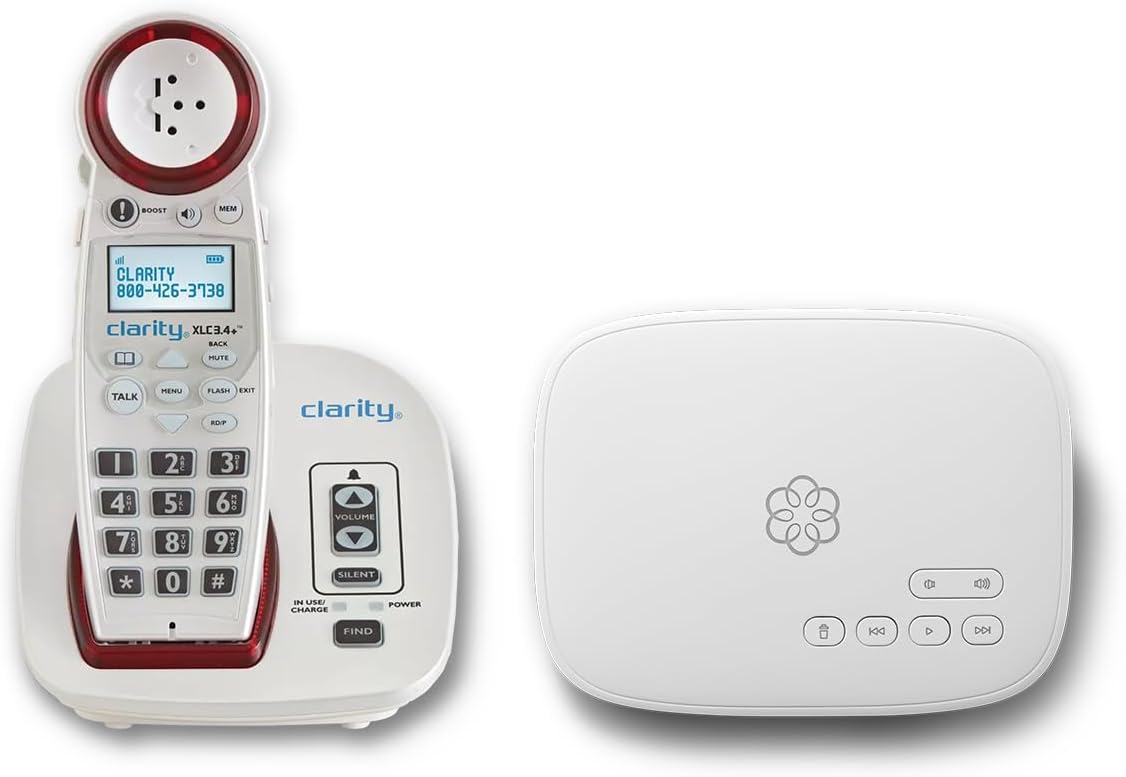
The Ooma Telo bundle combines a premium voice service with a highly amplified cordless phone for a complete communication solution. It excels in safety features like address based 911 alerts and visual ringer indicators for better accessibility.
We may earn a commission when you buy through this link, at no additional cost to you.
Users get unlimited calling across the US Canada and Mexico plus advanced call blocking to keep unwanted calls away. The setup assistance ensures that seniors can start using it quickly without technical hurdles.
While this option involves a monthly fee the service quality and safety features justify the investment for many. The lack of traditional captioning text is offset by clear audio and robust hearing aid compatibility.
This is perfect for households wanting an all-in-one solution with enhanced safety and call quality. It suits seniors who value clear communication and want reliable emergency features at their fingertips.
When 911 is called the system sends the exact address to dispatchers and texts family members for extra safety.
Amplified sound and visual ringers ensure no calls are missed even in noisy environments or low hearing conditions.
We may earn a commission when you buy through this link, at no additional cost to you.
The VTech SN5147 offers a hybrid system with both a corded base and a cordless handset for flexibility. It is designed specifically for seniors with hearing loss focusing on amplified audio and simple dialing.
We may earn a commission when you buy through this link, at no additional cost to you.
Key features include a 90dB ringer with visual indicators and big buttons for easy access. The photo speed dial slots make it easy to call loved ones with just one touch.
Although it does not support real time text captions the amplified sound and answering machine provide clear communication tools. The ability to expand up to four handsets is useful for larger homes.
This model is best for families needing mobility within the home while maintaining easy access. It balances practicality and sound amplification without complex setup or internet requirements.
The corded base ensures calls work during power outages while the cordless handset offers mobility around the house.
Flashing lights alert users to incoming calls so they never miss an important call even with lower volume.
We may earn a commission when you buy through this link, at no additional cost to you.
This home telephone uses voice commands to dial answer and end calls without touching any buttons. It is ideal for those with severe mobility or vision difficulties who need a completely hands-free device.
We may earn a commission when you buy through this link, at no additional cost to you.
The active listening feature ensures the phone is always ready to take a command making calling effortless. It connects directly to a home phone line so no internet setup is needed.
Because it lacks a screen or dial pad users must rely entirely on voice prompts and audio feedback. This can be challenging for those who prefer visual cues or have difficulty speaking clearly.
It is a niche product best suited for users with significant physical limitations. If voice interaction is preferred over button pressing this device simplifies the calling process significantly.
Dialing answering and hanging up are done entirely with voice commands removing the need to touch the device.
The phone stays active and ready to listen for commands at any time ensuring quick access for calls.
We may earn a commission when you buy through this link, at no additional cost to you.
This big button phone focuses on accessibility with large buttons and picture memory storage for easy dialing. It offers significant volume amplification to help those with hearing impairments hear conversations more clearly.
We may earn a commission when you buy through this link, at no additional cost to you.
The wall mount design allows for flexible placement in kitchens or hallways keeping it accessible everywhere. Stored numbers are protected even if the phone line is unplugged which prevents data loss.
While it lacks a visual display for caller ID the simplicity is a strength for users with low vision. The adjustable volume ensures it meets varied hearing needs without complex menus or settings.
This device is ideal for households needing a reliable wall mounted phone for seniors. Its focus on volume and physical simplicity makes it a strong choice for everyday communication.
Wall mountable design lets you place the phone where it is most accessible without taking up counter space.
Stored contacts remain safe even during power or line outages ensuring no loss of important numbers.
We may earn a commission when you buy through this link, at no additional cost to you.
This VoIP phone is designed for modern homes with internet phone service offering a modern take on accessibility. It features customizable image keys for dementia patients and very high volume for hard of hearing users.
We may earn a commission when you buy through this link, at no additional cost to you.
The 110dB speaker ensures loud clear audio even in noisy environments and the red light alert adds visual cues. A dedicated help key provides instant access to emergency contacts for extra safety.
It is crucial to note that this device requires active VoIP service and will not work on standard landlines. This limits its use but for compatible setups it offers excellent connectivity and safety features.
This model is best for nursing homes or tech ready seniors needing specialized safety features. The image keys help maintain independence while the loud audio keeps everyone connected clearly.
Photo slots let users identify contacts by face rather than numbers making it easier to reach family.
A dedicated help key and visual alerts ensure quick assistance and no missed calls in any environment.
We may earn a commission when you buy through this link, at no additional cost to you.
Serene Innovations delivers a high definition amplified phone focused on sound quality and performance. It is built to provide clear audio for those who struggle with standard telephone clarity and background noise.
We may earn a commission when you buy through this link, at no additional cost to you.
The device emphasizes reliability and quality construction to ensure consistent use. While it lacks advanced smart features like captioning or photo memory it excels in basic phone performance.
Given its price point some users might expect more connectivity or smart options. However for those who prioritize pure audio clarity and durability this unit offers a straightforward and reliable solution.
This is a good choice for users needing simple high quality sound without complex functions. It suits traditional phone users who want a robust device for daily clear conversations.
Engineered for high definition audio ensuring every word is clear even for difficult hearing conditions.
Built for consistent use with quality components that withstand daily wear and tear effectively.
We may earn a commission when you buy through this link, at no additional cost to you.
This Voice Dialer Phone combines voice commands with visual alerts for those needing hands-free calling. It supports 17 voice memories and offers talking Caller ID for better clarity without looking at the device.
We may earn a commission when you buy through this link, at no additional cost to you.
The visual LED ring indicator helps ensure no calls are missed even if the ringer volume is low. However user reviews suggest the voice recognition can be inconsistent requiring careful pronunciation.
While it aims to simplify calling through voice commands some users find the learning curve steep. It is best suited for patients who are already comfortable with voice interaction technologies.
Consider this model if you need talking Caller ID and voice dialing together. For users who prefer reliable audio feedback it provides a unique alternative to standard keypads.
Program up to 17 names into voice memory for quick access without typing or searching contacts.
Bright LED indicators flash for incoming calls ensuring visual confirmation even in noisy environments.
We may earn a commission when you buy through this link, at no additional cost to you.
This phone prioritizes simplicity with nine photo memory keys for one-touch dialing. It is designed for seniors with dementia or vision issues needing a reliable way to stay connected with loved ones easily.
We may earn a commission when you buy through this link, at no additional cost to you.
The 110dB ringer and LED flash alerts ensure every call is noticed no matter the environment. Hands-free calling makes operation comfortable for those with arthritis or limited hand strength.
It does not include caller ID or voicemail functions to keep the interface simple and focused. This trade-off ensures that users are not overwhelmed by menus or technical settings they may find confusing.
Ideal for daily home care or assisted living facilities this phone bridges communication gaps effectively. Its simplicity and loud sound make it a practical choice for elderly care needs.
Press a photo of a family member to call instantly without remembering numbers or searching contacts.
Works directly from the phone line so it stays functional even when the power goes out at home.
We may earn a commission when you buy through this link, at no additional cost to you.
Choosing the right captioned telephone involves considering hearing needs, accessibility features, and home setup compatibility. Here are key factors to evaluate before making a purchase.
Most captioned phones require a high speed internet connection or telephone line to enable real time text. Ensure your home has the necessary connectivity before purchasing an internet based unit to avoid service issues.
Check if the device needs US residency and registration with FCC certified providers to activate captions. This process is standard for captioned phones but should be understood upfront to avoid delays.
Look for phones with adjustable volume levels between 40dB to 110dB depending on your hearing loss severity. Higher dB ratings ensure clarity in noisy environments or for those with significant hearing challenges.
Speakerphone options and hearing aid compatibility add flexibility for daily use. Verify the phone supports your hearing aids or hearing assistive technology for optimal sound clarity.
Photo speed dialing and large buttons help seniors with dementia or vision impairments make calls easily. Consider models with hands-free calling if arthritis or mobility issues make holding a handset difficult.
Voice dialing options offer an alternative for those unable to press buttons. However ensure the device's voice recognition is tested to confirm it meets your needs accurately.
Flashing LED lights or visual ringers are essential if you miss calls due to low ringer volume. These indicators ensure no calls are missed even in noisy environments or when the phone is away from your seat.
Check if the visual alerts are bright enough for your specific visibility needs. Some phones offer multiple settings to customize flash rates and brightness levels accordingly.
Traditional corded phones work during power outages while VoIP models rely on internet routers. If power stability is a concern prefer models with corded bases or battery backup features.
Verify whether the phone uses standard RJ11 lines or internet protocols. Misunderstanding this can lead to purchasing incompatible units that do not work with your current setup.
Phones with dedicated help keys or 911 address text alerts provide extra security for seniors living alone. These features ensure quick access to emergency services when seconds matter.
Consider models that allow contact lists to be saved securely. Memory protection prevents loss of important numbers during power or line disruptions.
Many captioned phones include answering machines or voicemail captioning for clearer message review. Check if spoken Caller ID is available if you prefer hearing names rather than reading them.
Some budget models may lack Caller ID screens to simplify the interface. Decide if visual caller info is a priority versus keeping menus simple and distraction free.
While some captioned services are free basic models often come with higher upfront costs. Compare subscription fees for VoIP bundles against the value of added safety and call features.
Consider the long term value of the device. A slightly higher price may be worth it for durability, better sound quality, and reliable customer support.
Start by connecting the phone to your power source and telephone line or internet router depending on the model. Follow the included manual to register with a captioning service if required for text features to activate.
Customize settings such as caption size, volume, and ring volume to suit your hearing comfort. Test a call to ensure the captions appear and the sound is clear before regular use.
Keep the phone in a dry area away from direct sunlight or moisture to maintain its functionality. Clean the screen with a soft cloth to ensure the display remains clear for easy reading.
Most modern captioned telephones rely on high speed internet or Wi-Fi to deliver real time text captions. Traditional landline models may not need internet but may lack advanced captioning features. Always check the product specs for connectivity needs.
Many providers offer captioning services at no cost to eligible US residents with hearing loss. However some bundles or VoIP services may require subscription fees for calls and support. Verify service requirements before purchasing.
Yes, many captioned phones are hearing aid compatible and offer adjustable volume for better sound clarity. Look for models explicitly marked as hearing aid compatible to ensure seamless integration with your devices.
Corded phones that connect directly to the telephone line often work during power outages. VoIP and internet models will not work without power unless you have a backup system. Check power needs before buying.
Most phones allow you to assign family photos to speed dial buttons by following menu prompts. Simply insert a photo or select a contact from memory to link to that button for one touch calls.
Slow internet or poor network quality can cause caption delays. Try restarting the router or checking your connection speed. Adjusting caption size or contacting service support may also improve clarity.
Most captioned telephone services are limited to US residents due to FCC certification requirements. International calling may not include captioning features. Check service eligibility before purchasing for travel use.
We reviewed ten captioned telephone models ranging from simple landline phones to advanced VoIP bundles. The top picks include the Hamilton CapTel 2400iSPNBT for best overall, a corded landline for best budget, and the Ooma Telo bundle for premium safety.
Prioritize features that match your specific hearing and mobility needs such as amplified volume, visual alerts, or hands-free calling. The right device can greatly improve communication quality and provide peace of mind.
Remember that prices and availability change frequently so check current details before purchasing. Select the model that best supports your daily communication goals for long term satisfaction.