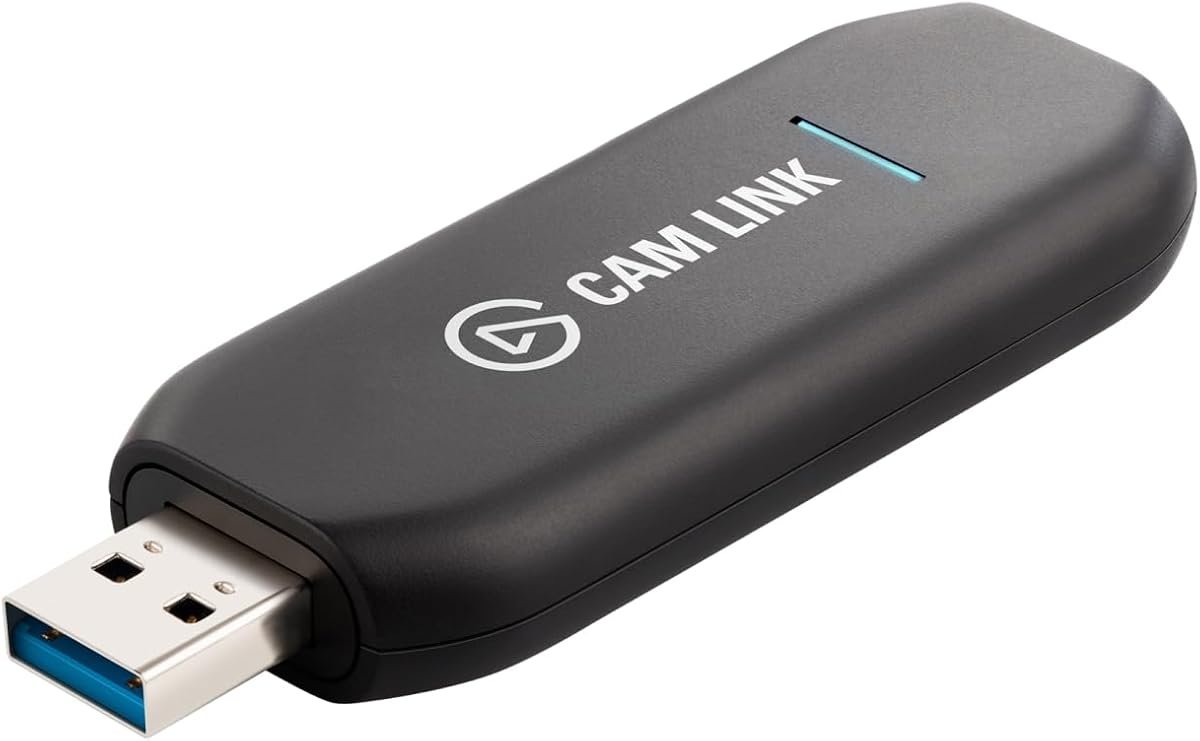
Elgato Cam Link 4K
4.6Editor score
DSLR and camera support
4K60 resolution record
USB 3.0 interface
This comprehensive guide compares the top ten Elgato capture cards for streaming and recording, evaluating performance, features, and compatibility to help you
Finding the right capture card is essential for creators who want to share high-quality gameplay or video content with their audience. The best devices offer seamless integration, low latency, and support for modern resolutions like 4K. Whether you stream on Twitch or record highlights, quality hardware matters.
We evaluated ten leading models from Elgato to identify which ones deliver the most reliable performance for different needs. Our analysis focused on resolution support, connectivity options, and ease of setup across various platforms. This list covers external and internal cards suitable for beginners and professionals alike.
Each selection highlights specific strengths that cater to distinct streaming scenarios and budget considerations. You will see how each model handles resolution, frame rates, and pass through capabilities for smooth gaming. Keep in mind that availability and pricing may vary, so verify details before purchasing.
4.6Editor score

4.5Editor score

4.5Editor score
This table provides a quick side-by-side overview of the key specifications and features for each model to help you narrow down your choice based on your specific streaming requirements.


The Elgato 4K X stands out as the premier choice for modern streamers who demand top-tier visual fidelity. Its ability to capture gameplay at 4K resolution with up to 144 frames per second ensures that every action looks smooth and sharp on your broadcast.
We may earn a commission when you buy through this link, at no additional cost to you.
This model leverages HDMI 2.1 technology to provide next-gen connectivity for both input and output. The built-in Variable Refresh Rate passthrough guarantees that your gameplay remains free from screen tearing, while the USB 3.2 Gen 2 connection keeps latency to an absolute minimum for responsive streaming.
While the performance is exceptional, users should note that fully utilizing these features requires a powerful computer and compatible HDMI 2.1 cables. Without these prerequisites, you may not see the full benefit of the high frame rate and resolution capabilities.
If you are serious about high-fidelity streaming and own next-gen consoles or high-end PCs, this card is the ideal investment. It delivers the reliability and quality needed to produce professional-grade content without compromising on visual detail or responsiveness.
Capture fast-paced action with up to 144 frames per second in 4K, ensuring fluid motion that standard cards simply cannot match.
HDMI 2.1 and VRR passthrough work together to provide a lag-free gaming experience even while you are actively streaming.
We may earn a commission when you buy through this link, at no additional cost to you.
The Elgato Cam Link 4K is an excellent budget-friendly solution for creators who want to upgrade their video quality without investing in expensive webcams. It transforms any compatible DSLR or mirrorless camera into a professional streaming webcam with stunning 1080p60 or 4K60 detail.
We may earn a commission when you buy through this link, at no additional cost to you.
Designed for versatility, it works with various devices including camcorders, action cams, and even your iPhone. The ultra-low latency ensures your video and audio stay perfectly in sync, making it ideal for live broadcasts where timing is critical for audience engagement.
One limitation to consider is that it does not pass through audio, so you will need to source audio separately via your computer or mixer. Additionally, you must ensure your camera is compatible and that you use the latest model to unlock the full 4K60 capabilities.
For videographers or streamers on a budget who want professional camera quality, this device offers exceptional value. It bridges the gap between hobbyist and professional gear, allowing you to produce higher quality content with equipment you may already own.
Connect your existing DSLR to instantly improve your video quality, bringing cinema-level depth and sharpness to your streams.
Beyond cameras, it can accept input from action cams and phones, offering flexibility for various content types.
We may earn a commission when you buy through this link, at no additional cost to you.
The Elgato 4K Pro Internal capture card is designed for power users who need maximum bandwidth and resolution support. It delivers an unrivaled gaming experience by allowing 8K60 passthrough while simultaneously capturing gameplay in stunning 4K60 quality.
We may earn a commission when you buy through this link, at no additional cost to you.
Equipped with HDMI 2.1 connectivity, this model supports high frame rates up to 240fps in 1080p. The VRR passthrough ensures smooth visuals, and the internal PCIe design minimizes latency by leveraging direct motherboard bandwidth for superior performance stability.
While the performance is top-tier, installation requires an available PCIe slot in your desktop PC, which may limit compatibility with smaller form factor systems. The price point is also higher than external options, reflecting its premium feature set and robust build quality.
This card is the ultimate choice for professional streamers with high-end desktop setups who prioritize raw performance. It ensures every moment is captured with precision, making it the preferred tool for those who demand the highest fidelity in their broadcast.
PCIe installation eliminates USB bottlenecks, ensuring stable high-resolution capture even during long streaming sessions.
Support for 8K passthrough prepares your setup for next-gen displays and games before they become mainstream.
We may earn a commission when you buy through this link, at no additional cost to you.
The Elgato Game Capture Neo is a tiny yet mighty solution for creators who need to stream from any console on the go. It fits in your pocket and connects directly to consoles like PlayStation, Xbox, or Switch without requiring complex setups.
We may earn a commission when you buy through this link, at no additional cost to you.
While it captures video at 1080p60, it offers 4K60 HDR passthrough so you do not need to compromise your gameplay quality. The device is designed for ease of use, connecting simply to your computer or iPad to record or stream stunning Full HD content.
The trade-off is that you cannot capture HDR content; the output is limited to SDR despite the HDR input support. However, for mobile streaming or casual setups where simplicity is key, this limitation is often acceptable given the device's portability.
This device is perfect for travelers or those with limited space who still want to record console gameplay. Its simple connectivity and reliable performance make it an accessible entry point into content creation without overwhelming technical requirements.
Carry your streaming setup anywhere with a device that is small enough to fit in a bag alongside your console.
Works seamlessly with major gaming systems, allowing you to capture content from any device without extra adapters.
We may earn a commission when you buy through this link, at no additional cost to you.
This renewed version of the Elgato 4K Pro Internal offers the same powerful features as the new model at a reduced price point. It supports 8K60 passthrough and captures gameplay in 4K60 HDR, providing vibrant colors and high fidelity for your streams.
We may earn a commission when you buy through this link, at no additional cost to you.
Designed for dual PC setups, it allows seamless broadcasting between machines. The HDR10 capture capability ensures lifelike colors, and the low latency keeps your gameplay synchronized. However, being a renewed product, it may come with different warranty terms than brand new items.
The rating reflects some variability in the condition of renewed units, which can be a risk for users seeking guaranteed perfection. If you are comfortable with potentially varied cosmetic conditions and want professional features for less, this is a viable option.
Buyers looking for professional features without the premium price tag should consider this model carefully. Ensure you understand the return policy and warranty before purchasing, as this can mitigate the risks associated with renewed electronics.
Access high-end PCIe capture features without the full retail cost by choosing a certified renewed unit.
Experience enhanced visual quality with HDR10 capture, delivering rich and detailed colors in your recorded content.
We may earn a commission when you buy through this link, at no additional cost to you.
The Elgato HD60 S is a reliable workhorse for streamers who need consistent 1080p60 recording and streaming. Its true passthrough technology ensures you play your console games with zero lag, while ultra-low latency tech powers your workflow efficiently.
We may earn a commission when you buy through this link, at no additional cost to you.
One of its standout features is Flashback recording, allowing you to save epic moments retroactively without setting up a dedicated record beforehand. This is perfect for creators who might miss the start of a big play. You can also record hours of footage directly to your hard drive.
While it does not support 4K or HDR, it remains a solid choice for Full HD streaming where simplicity and speed are priorities. The USB design makes it plug-and-play, ensuring easy setup for both PC and Mac users without complex configuration steps.
Ideal for beginners or those focused on 1080p platforms, this card offers dependable performance. It balances cost and features effectively, making it a popular choice for consistent daily streaming and recording sessions.
Flashback Recording ensures you never miss a highlight by capturing the last few minutes of gameplay instantly.
Play on your TV without interruption thanks to high-quality passthrough that maintains visual fidelity and speed.
We may earn a commission when you buy through this link, at no additional cost to you.
The Elgato Game Capture HD60 provides flawless 1080p quality at 60fps for sharing gameplay on social media. It is designed for seamless sharing, allowing one-click uploads to platforms like YouTube, Facebook, and Twitter directly from your workflow.
We may earn a commission when you buy through this link, at no additional cost to you.
It includes a built-in live commentary feature that makes adding voiceovers easier without extra software. With unlimited capture right to your PC or Mac, you can record long sessions without worrying about running out of space. Flashback Recording adds retroactive saving capabilities.
This model is slightly older compared to newer options, which means it lacks support for newer USB standards like USB-C. However, for users who want a straightforward, reliable capture solution for basic 1080p needs, it remains a functional choice.
It is well-suited for casual gamers who want to share highlights quickly. The focus on social sharing and ease of use makes it an accessible tool for those starting their content creation journey.
Share clips instantly to your favorite platforms with one-click tools that simplify your content distribution workflow.
Add live commentary directly through the software, making it easy to narrate gameplay without extra hardware.
We may earn a commission when you buy through this link, at no additional cost to you.
The Elgato HD60 S+ upgrades the classic model with support for HDR10 capture and 4K60 HDR10 passthrough. This allows you to share gameplay in superb viewing quality with vivid colors that match your console's output.
We may earn a commission when you buy through this link, at no additional cost to you.
It offers 4K60 HDR10 zero-lag passthrough so you can play games in their original format without degradation. The Instant Gameview feature powers your workflow with ultra-low latency, ensuring you can react instantly during live streams without delay.
This device is pricier than standard models due to its advanced HDR capabilities. If your setup includes HDR displays and you want to capture that dynamic range, the investment is justified for the visual fidelity it provides.
For streamers targeting platforms that support HDR content, this card is a significant upgrade. It ensures your footage stands out with vibrant contrast and colors, enhancing the viewer experience compared to standard dynamic range video.
Capture rich 1080p60 HDR10 content that delivers deep contrast and bright highlights for a more immersive look.
Play your favorite games in native resolution and frame rate while capturing the output in high quality.
We may earn a commission when you buy through this link, at no additional cost to you.
The Elgato HD60 Pro is a PCIe capture card that offers the stability of an internal connection without the complexity of higher-end internal models. It captures gameplay in superb 1080p60 quality and provides true passthrough so you can play with zero lag.
We may earn a commission when you buy through this link, at no additional cost to you.
Using low-latency technology, it ensures your workflow is powered by Instant Gameview for real-time monitoring. This makes it an excellent choice for streamers who prefer internal stability but need a straightforward 1080p solution without full HDR overhead.
While it lacks HDR capture support, it is robust and reliable for standard dynamic range streaming. The PCIe interface removes USB bottlenecks, making it a reliable option for long recording sessions where connection stability is critical.
Install this if you want a durable, internal option for 1080p streaming. It balances performance and ease of use, providing the stability needed for serious content creators who do not require 4K HDR features.
Internal PCIe connection avoids USB bandwidth limitations for consistent performance during extended streaming.
Enjoy lag-free gaming on your main monitor while the card handles the recording and streaming tasks separately.
We may earn a commission when you buy through this link, at no additional cost to you.
This HDMI capture card offers a budget-friendly alternative that supports 1080p capture at 60 frames per second. It is designed to work with various HDMI devices including consoles and cameras, making it accessible for simple streaming needs.
We may earn a commission when you buy through this link, at no additional cost to you.
It features microphone input for commentary, allowing you to add voiceovers without external mixers. The device detects input and adjusts output automatically, ensuring ease of use for those who prefer plug-and-play setups without driver installation.
While it claims to handle 4K input, the output is capped at lower resolutions, so it is not suitable for high-resolution recording. For basic 1080p streaming and recording, it remains a cost-effective solution for hobbyists with limited budgets.
If you need a basic capture tool that does not require complex configuration, this card is worth considering. It provides essential streaming features at a fraction of the cost of branded professional hardware.
Connect a microphone directly to the card to narrate your gameplay without additional audio interfaces.
Avoid driver headaches; simply plug the device in to start recording instantly with supported software.
We may earn a commission when you buy through this link, at no additional cost to you.
Choosing the right capture card depends on your specific streaming needs and hardware setup. Here are the key factors to consider before making a purchase.
Resolution and frame rate determine the visual quality of your broadcast. If you stream high-end consoles, look for models that support 4K capture and high frame rates like 120fps to ensure smooth motion.
For standard gaming, 1080p60 remains a solid choice for most viewers. Match the capture card's capabilities to your monitor and console output to avoid bottlenecks.
Internal capture cards connect via PCIe and offer greater bandwidth stability for dedicated streaming rigs. External cards connect via USB and provide portability for setups that need flexibility across devices.
Choose internal if you have a desktop PC with available slots. Choose external if you use laptops or need to move your gear between locations easily.
Low latency is critical for responsive gameplay during live streams. Ensure the device offers ultra-low latency and high-quality passthrough so you can play on your main monitor without lag.
Always verify that the passthrough supports the resolution you game in. Poor passthrough can degrade your gaming experience even if the recording quality is good.
Check that the capture card supports HDMI 2.1 if you own next-gen consoles. Older USB standards might limit your ability to utilize high bandwidth video signals effectively.
USB 3.0 is generally required for 4K capture. Ensure your computer has the necessary ports to avoid connection issues or performance drops.
The capture card should work seamlessly with streaming software like OBS, Streamlabs, and Twitch Studio. Compatibility ensures you can customize your stream settings without technical hurdles.
Look for devices that offer dedicated apps for editing or quick sharing. This adds value by simplifying your workflow from capture to publication.
High Dynamic Range support allows for richer colors and contrast in your video. If you want to capture HDR content, ensure the card specifically lists HDR10 support for input and output.
Without HDR support, your footage may look washed out compared to the source. This is a key differentiator for premium streaming experiences.
Some cards allow for direct audio capture or include microphone inputs. This simplifies your setup by removing the need for external audio interfaces.
Check if the card passes through audio correctly. Clear sound is just as important as video for viewer engagement and stream quality.
Price often correlates with feature depth and build quality. Determine how much you are willing to spend based on your content goals and current equipment.
Consider warranty terms especially if buying renewed. A good warranty protects your investment and ensures support if technical issues arise.
Connect your console or camera to the capture card using a high-speed HDMI cable. Then plug the USB or PCIe card into your computer. Launch your preferred streaming software and select the card as your video source to begin capturing.
Update the drivers and software regularly to ensure compatibility with the latest operating systems and consoles. This maintains stable performance and prevents issues during live broadcasts or recording sessions.
Keep your equipment clean by dusting the ports and ensuring proper ventilation. Avoid moving external cables excessively to prevent damage. Regular maintenance helps prolong the lifespan of your capture device.
Not necessarily for basic 1080p capture, but for 4K or high frame rate recording, a capable CPU and GPU are recommended. The processing power helps encode video smoothly without impacting gameplay performance. Always check the system requirements for the specific model you choose.
Most budget cards focus on 1080p capture, though some support 4K pass-through. Full 4K recording usually requires higher-end models. If 4K output is not critical for your viewers, 1080p is often sufficient and saves money.
Use High-Speed HDMI cables that match the version supported by your card. For HDMI 2.1 features, use certified Ultra High Speed cables to ensure you get the full bandwidth without signal loss or degradation.
HDR adds depth and vibrancy to your video, which can make your stream stand out. If your audience uses HDR displays and you own an HDR monitor, it is worth the investment. Otherwise, SDR is still widely supported and effective.
Most modern capture cards are plug-and-play on Windows and macOS. However, installing the latest software from Elgato ensures you have access to advanced settings and updates for optimal performance.
Yes, all recommended models support local recording and live streaming at the same time. This allows you to save high-quality footage for later editing while broadcasting to your viewers in real time.
The Elgato 4K X leads the pack for its unmatched frame rates and modern connectivity, making it the ideal choice for serious creators. For those prioritizing portability, the Game Capture Neo offers a compact solution without sacrificing essential features.
When selecting a model, focus on your target resolution and your computer's interface capabilities. Balancing these factors will ensure you get the smoothest streaming experience without technical bottlenecks or unnecessary expenses.
Prices and availability change frequently so always verify the current listings before purchasing. This guide highlights the best options currently available to help you make an informed decision for your content creation journey.