
Netgate 1100 pfSense+ Security Gateway
4.1Editor score
Pre-loaded pfSense+ software
Dual core ARM Cortex processor
Three 1 GbE switched ports
This guide compares the top 10 hardware firewalls for businesses in October 2026, evaluating performance, security features, and ease of use for network
Hardware firewalls provide essential protection for business networks by filtering traffic before it reaches internal devices. They offer robust security features that software alone cannot match.
We compared ten leading models based on throughput, user capacity, management tools, and threat protection capabilities. Each selection targets specific business sizes and security needs.
Each pick shows key strengths and ideal use cases for different network environments. Prices and availability change frequently so verify current details before purchasing your device.
4.1Editor score

4.7Editor score

4.5Editor score
This side-by-side comparison highlights key specifications across all ten models. Review throughput speeds, port configurations, and security capabilities to find the right fit for your network.


The SonicWall TZ280 stands out as a top choice for small business networks needing strong security without enterprise complexity. It carries a high user rating reflecting reliability and performance.
We may earn a commission when you buy through this link, at no additional cost to you.
Its Reassembly-Free Deep Packet Inspection engine delivers 2.5 Gbps firewall inspection enabling fast traffic analysis. The eight 1GbE ports plus two SFP slots offer versatile connectivity for various setups.
Note that security services require a separate subscription which adds ongoing cost. The appliance runs efficiently but you must manage firmware and support separately to maintain protection.
Small offices seeking powerful protection with scalable connectivity should prioritize this unit. It balances performance features and ease of use effectively for most distributed work environments.
SonicOS 8 provides intrusion prevention and sandboxing to block advanced threats effectively.
Deploy and manage locally or via cloud Network Security Manager for flexibility.
We may earn a commission when you buy through this link, at no additional cost to you.
Netgate 1100 offers exceptional value for users seeking a ready-to-use firewall gateway without extra licensing costs. Its pfSense+ software is pre-installed for immediate deployment.
We may earn a commission when you buy through this link, at no additional cost to you.
The dual core ARM processor handles common traffic well with over 650 Mbps firewall throughput. Three 1GbE switched ports allow configuration for WAN LAN and optional traffic segregation easily.
Throughput limits make it less suitable for high speed internet connections above 500 Mbps. However the included support and lifetime updates provide strong long-term support for small setups.
Budget conscious buyers or home labs will appreciate the complete package without hidden fees. It remains a solid entry point for professional security management tools and interfaces.
Unbox and start customizing for secure edge needs with expert TAC help available.
Low power draw and silent design enable unnoticed desktop wall or rack placement.
We may earn a commission when you buy through this link, at no additional cost to you.
Sophos XGS 128 delivers enterprise level performance for large offices requiring maximum bandwidth and reliability. Its purpose built hardware ensures visibility and stable operation under heavy load.
We may earn a commission when you buy through this link, at no additional cost to you.
With nine 2.5 GE copper ports and one SFP fiber port it supports up to 19.1 Gbps firewall throughput. SD-WAN optimization provides resilient routing across multiple connections for seamless traffic flow.
The cost is significant and full protection requires an added subscription. This model is best suited for organizations that need high speed secure site to site networking now.
Large offices prioritizing speed and reliability will find this appliance ideal. It combines advanced threat protection with intelligent traffic routing for distributed network environments.
SD-WAN delivers intelligent traffic routing across multiple WAN connections effectively.
VPN ready architecture supports encrypted remote employee access securely.
We may earn a commission when you buy through this link, at no additional cost to you.
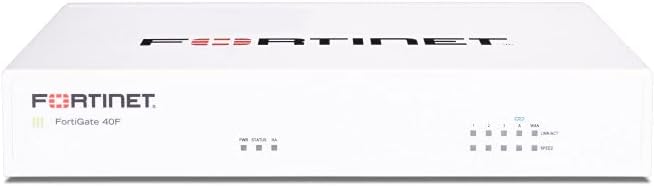
FortiGate 40F provides robust security in a compact fanless desktop design ideal for small to mid-sized businesses. It offers quiet operation minimizing space usage in office environments.
We may earn a commission when you buy through this link, at no additional cost to you.
Equipped with five GE RJ45 ports it ensures essential connectivity and flexibility. Fortinet's AI-powered FortiGuard Labs identifies known and unknown threats effectively across your network.
While performance is strong the unit requires a separate subscription for full protection features. Management remains simplified with Zero Touch Integration and comprehensive network automation visibility tools.
Small branch offices needing quiet efficient security will appreciate this appliance. Its compact design and intuitive management make deployment straightforward for non-technical users.
FortiGuard Labs identifies and mitigates threats using purpose-built security processors.
Zero Touch Integration with Security Fabric enables easy setup and automation.
We may earn a commission when you buy through this link, at no additional cost to you.
Zyxel USGFLEX100H supports up to 50 users with SPI throughput of 4000 Mbps and optional security packs. It features offline-capable setup ensuring web interface remains accessible during updates.
We may earn a commission when you buy through this link, at no additional cost to you.
Eight assignable 1G ports allow flexible WAN LAN configurations. Centralized Nebula Management and VPN support provide SD-VPN orchestration for secure remote access easily.
Entry Defense Pack includes reputation filtering but deeper features require Gold Security Pack. Offline updates ensure continuity while keeping configuration accessible during network changes.
Businesses needing centralized visibility and resilient connectivity will find this firewall suitable. Its flexible port options support load balancing and VLANs for complex network needs.
Configure via Nebula wizard and update firmware offline while keeping interface accessible.
Policy sync and orchestration support secure remote employee access efficiently.
We may earn a commission when you buy through this link, at no additional cost to you.
FortiGate-70G offers next-gen firewall capabilities with NGFW IPS and web filtering built in. Secure SD-WAN improves cloud performance while maintaining consistent security policy across branches.
We may earn a commission when you buy through this link, at no additional cost to you.
Deep visibility with SSL inspection identifies encrypted traffic efficiently. Centralized management via FortiGate Cloud simplifies deployment and ongoing security monitoring for teams.
Seamless integration with FortiSwitch and FortiAP creates a unified wired and wireless network. This model suits branches needing advanced protection without separate software licenses.
Branch offices seeking high speed and centralized control should consider this unit. Its perfect design supports robust security and performance for growing networks effectively.
Cloud and SaaS performance improve while maintaining consistent security policy.
Seamless integration with FortiSwitch and FortiAP for secure wired and wireless.
We may earn a commission when you buy through this link, at no additional cost to you.
Zyxel USGFLEX700 targets mid-size to large offices with up to 500 user capacity and high throughput. Its 1-Year UTM security services include anti-malware and ransomware blocking.
We may earn a commission when you buy through this link, at no additional cost to you.
Twelve configurable Gigabit ports plus two fiber ports enable fast local network connectivity. High throughput SPI firewall reaches 5400 Mbps supporting up to 1600k sessions.
Nebula Cloud Pro management provides unparalleled control and monitoring features. Complete security bundle includes IDP and application control ensuring comprehensive network defense.
Businesses requiring high performance and cloud management will find this firewall effective. Its robust throughput and complete services offer security and ease of operation.
Includes anti-malware ransomware blocking web filtering and IDP services.
Award winning Nebula Cloud Management enables easy network security control.
We may earn a commission when you buy through this link, at no additional cost to you.
SonicWall TZ680 delivers up to 5 Gbps firewall inspection for high-end SMB needs. Zero-touch deployment and cloud management simplify setup and ongoing maintenance for IT teams.
We may earn a commission when you buy through this link, at no additional cost to you.
Threat protection includes gateway anti-malware and Capture ATP sandboxing with active subscription. Secure SD-WAN and Zero-Trust Network Access protect remote workers and distributed sites.
Note that security services require separate subscription and maintenance. The hardware supports flexible connectivity with SFP+ and SFP ports for varied network configurations.
High-end SMBs needing advanced threat protection will appreciate this appliance. Its performance and management features ensure distributed networks remain secure against modern threats.
Multi-engine sandboxing and reputation-based content filtering ensure threat detection.
Cloud Secure Edge keeps remote workers protected securely.
We may earn a commission when you buy through this link, at no additional cost to you.
FortiGate 60F includes 36 months of FortiCare Premium and FortiGuard Unified Threat Protection. It secures against advanced online threats with comprehensive web filtering and anti-botnet technologies.
We may earn a commission when you buy through this link, at no additional cost to you.
This model is tailored for medium-sized businesses needing robust security without enterprise infrastructure. Reliable customer support ensures service continuity and high-quality assistance when issues arise.
Effective protection employs advanced filtering technologies to safeguard against sophisticated threats. The bundle offers value by combining hardware and three years of security services.
Businesses seeking long-term support and comprehensive protection should consider this option. Its optimized design and included services simplify security management for growing organizations.
Web filtering and anti-botnet technologies secure against advanced threats.
FortiCare Premium ensures high quality support and service continuity.
We may earn a commission when you buy through this link, at no additional cost to you.
Cisco ASA5525-X renewed offers a classic firewall with eight gigabit ethernet ports. This model provides proven security features trusted in enterprise environments previously.
We may earn a commission when you buy through this link, at no additional cost to you.
While older it delivers reliable performance for basic network protection needs. Cisco ASA edition ensures compatibility with established policies and configurations.
Renewed units may have limited modern threat detection compared to new hardware. However cost effectiveness makes it suitable for organizations needing reliable basic protection.
Teams familiar with Cisco ASA software will find this transition seamless. It remains an accessible option for those seeking proven enterprise firewall capabilities.
Proven security features trusted in enterprise environments for years.
Renewed unit provides access to ASA software at lower cost.
We may earn a commission when you buy through this link, at no additional cost to you.
Selecting the right hardware firewall requires evaluating throughput, user capacity, security features, and management capabilities against your network requirements.
Throughput determines how fast the firewall processes traffic without slowing connectivity. Match inspection speed to your internet bandwidth to avoid bottlenecks during peak usage.
Prioritize units with higher inspection ratings if you run high speed internet or many users.
Each model supports specific maximum users and concurrent sessions. Ensure the firewall can handle your current staff count plus projected growth over time.
Check session limits to prevent performance degradation during high traffic periods.
Ports define how devices connect to the network. Evaluate number and speed of Ethernet ports including options for fiber or WAN load balancing.
Flexible ports allow better network segmentation and redundancy for critical operations.
Modern firewalls include IPS, anti-malware, sandboxing, and web filtering. Verify which features require separate subscriptions versus those included with hardware.
Look for AI-powered threat protection to identify unknown and evolving risks.
User-friendly consoles reduce configuration time and ongoing maintenance effort. Cloud management options enable remote monitoring and updates without on-site visits.
Centralized management helps sync policies across multiple branches efficiently.
Secure remote access depends on VPN performance and encryption standards. SD-WAN optimizes traffic across multiple connections improving application performance.
Check supported tunnel limits to ensure they meet site-to-site and remote worker needs.
Zero-touch deployment and intuitive wizards simplify setup for small IT teams. Consider physical size and fanless operation for desktop or wall mounting options.
Easy deployment reduces downtime and accelerates security implementation.
Hardware warranties and technical support ensure continuity when issues arise. Check service levels and access to documentation or expert assistance.
Premium support packages help maintain service uptime and faster resolution.
Begin by connecting WAN and LAN ports according to your network layout and labeling cables clearly. Use the provided wizard to configure initial IP settings and access credentials.
Regularly update firmware through offline or portal methods to patch vulnerabilities and maintain performance. Check security logs weekly to identify unusual traffic patterns or blocked threats.
Keep the appliance in a well-ventilated area to prevent overheating and ensure quiet operation. Periodically review policies and adjust rules as your network grows and requirements change.
Hardware firewalls protect traffic before it reaches devices ensuring stronger network-wide defense. They offer dedicated performance without affecting host device resources.
Most models require a separate subscription to enable advanced threat detection features. The appliance works without it but full capabilities need ongoing service.
Modern next-gen firewalls include SSL inspection and secure SD-WAN to monitor encrypted cloud traffic. This ensures safety even when traffic is hidden by encryption.
Centralized cloud management lets you sync policies and monitor multiple units from one dashboard. Some models support site-to-site VPN tunnels for secure interconnection.
Choose a model with inspection speed higher than your internet bandwidth to avoid slowdowns. Higher capacity also supports more users and concurrent connections.
Renewed units undergo testing to ensure functionality and often include warranties. They provide access to proven hardware at lower cost with verified condition.
Most models support VLAN configuration to segment network traffic and improve security. Flexible ports allow separate LAN WAN and guest network isolation.
Update regularly when vendors release patches for vulnerabilities or features. Check release notes and test updates offline before full deployment.
Top picks like SonicWall TZ280 Netgate 1100 and Sophos XGS 128 provide strong options for budget premium and overall performance needs.
Prioritize throughput capacity user limits and security features to align with business growth and remote work requirements.
Verify current availability and service terms before purchase since prices and offers change frequently.