
Redragon K512 RGB Membrane Gaming Keyboard
4.5Editor score
Onboard macro recording without software
Dedicated media controls
Anti-ghosting key matrix support
This comprehensive guide compares the top keyboards with macro keys for 2026, evaluating build quality, customization, and performance to help you choose the
Finding the right input device can transform your workflow and gaming sessions significantly. Keyboards with macro keys offer specialized functionality that lets you execute complex sequences with a single press, saving time and reducing physical strain during intensive tasks.
To compile this list, we analyzed technical specifications, user feedback, and software ecosystems across leading brands. We prioritized models that balance reliability, customization depth, and ergonomic design to ensure they meet diverse needs for professionals and enthusiasts alike.
Each pick below highlights unique strengths and potential limitations based on current market offerings. Remember that availability and pricing fluctuate regularly, so verifying details before purchasing ensures you get the best value for your specific requirements and setup.
4.5Editor score

4.1Editor score
4.3Editor score
The following table provides a side-by-side overview of key specifications and features for each model to help you quickly identify which option aligns best with your typing preferences and workflow requirements.


The VSD K1 Pro stands out as a highly versatile option for users seeking both productivity and entertainment features in one device. With a strong rating from early adopters, it delivers on promises of deep customization through its unique integrated streaming deck functionality that adapts to different tasks.
We may earn a commission when you buy through this link, at no additional cost to you.
Its standout quality lies in the ability to assign unlimited switchable pages with LCD keys and knobs directly on the keyboard surface. This allows for rapid context switching between games, apps, or media controls without needing external hardware. The hot-swappable design further extends its lifespan by letting you change switches without soldering.
However, fully utilizing the LCD display requires installing specific software and maintaining a wired connection, which limits wireless flexibility. Additionally, the package does not include a USB-C to USB-C cable, which might be inconvenient for users who prefer modern connectors over the included USB-A cable.
This keyboard is ideal for streamers, gamers, and power users who need rapid access to complex commands. If you value hardware integration and tactile customization, the VSD K1 Pro offers a compelling blend of features that few other boards match at this price point.
Users can create multiple pages with customizable LCD keys and knobs for instant access to specific commands or macros, effectively turning the keyboard into a control surface.
The PCB supports both 3-pin and 5-pin switches, allowing enthusiasts to tailor the tactile feel and sound of the keyboard without needing any soldering tools or expertise.
We may earn a commission when you buy through this link, at no additional cost to you.
The Redragon K512 is a top choice for budget-conscious buyers who still want robust macro capabilities. It earns a high rating for its ability to record complex game combos directly on the board without requiring any software installation to start using it effectively.
We may earn a commission when you buy through this link, at no additional cost to you.
Key strengths include its six dedicated macro keys that function instantly, making it perfect for quick in-game actions or common shortcuts. The inclusion of a media wheel adds significant convenience for adjusting volume or skipping tracks without interrupting gameplay or work flow.
While it lacks the tactile feedback of mechanical switches, the membrane design ensures quiet operation and durability. The only trade-off is that deep customization requires optional software, but basic usage remains seamless for everyone regardless of technical skill level.
For anyone needing a reliable keyboard with immediate macro functionality at a low cost, the Redragon K512 delivers excellent value. Its balance of features and price makes it a strong contender for entry-level gamers and casual users alike.
Users can record and reassign macros directly on the keyboard using onboard keys, ensuring instant access to shortcuts without needing to install drivers or run background software.
A prominent media wheel allows for easy adjustment of volume and playback control, enhancing usability for media consumption without leaving the keyboard surface.
We may earn a commission when you buy through this link, at no additional cost to you.
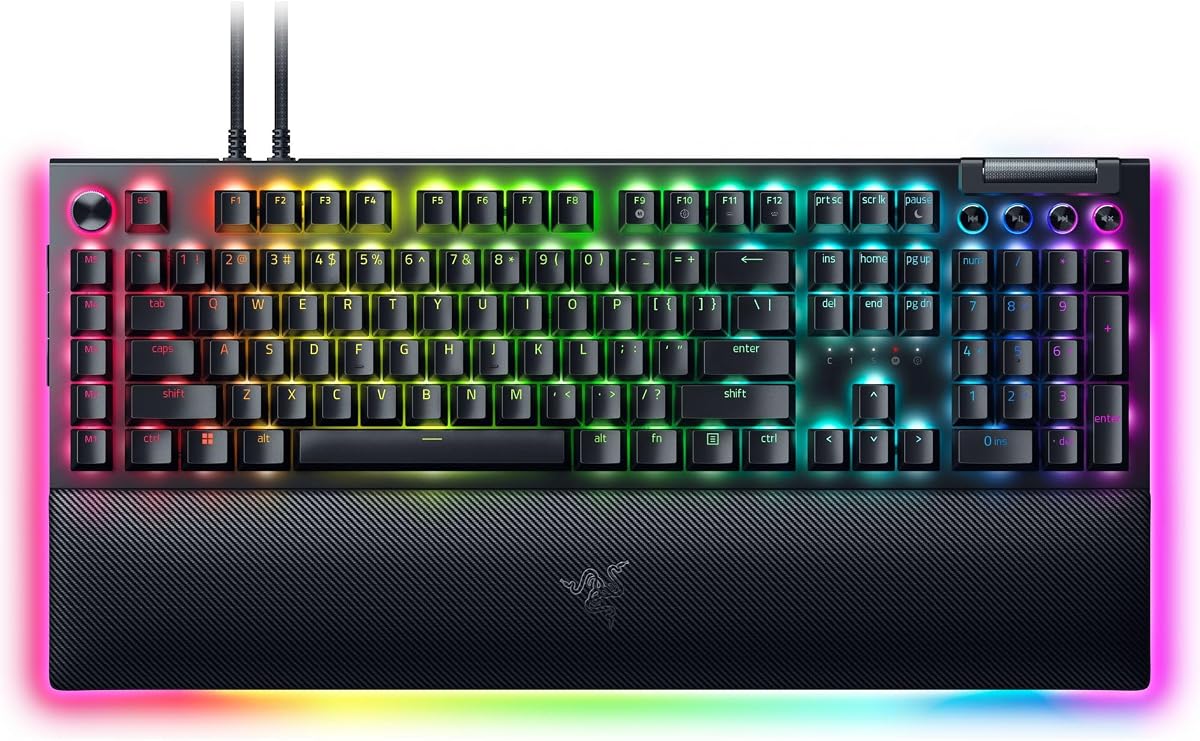
The Razer BlackWidow V4 Pro represents a premium tier of functionality with its command dial and eight dedicated macro keys designed for power users. It consistently receives praise for build quality and the depth of customization available through its ecosystem.
We may earn a commission when you buy through this link, at no additional cost to you.
Its standout feature is the command dial which can be assigned custom functions alongside the macro keys, creating a robust control panel directly on the keyboard. The plush leatherette wrist rest with underglow adds a luxury touch that matches the high-end aesthetic of the board.
While the price is higher than most competitors, the extra macro keys and dial justify the cost for those who need extensive command sets. The main drawback is the reliance on software to unlock full potential, which may deter those seeking plug-and-play simplicity.
This keyboard is best suited for professionals and enthusiasts who demand top-tier performance and extensive customization options. If you are willing to invest in a premium device that grows with your needs, the BlackWidow V4 Pro is an exceptional choice.
A dedicated command dial allows users to assign unique functions such as scrolling or volume control, offering an additional layer of interface control beyond standard keys.
Eight easily accessible macro keys provide ample space for binding complex sequences or shortcuts, enabling efficient task management across various software applications.
We may earn a commission when you buy through this link, at no additional cost to you.
The Corsair K55 RGB PRO is a reliable option for those seeking a durable membrane keyboard with macro capabilities. Its rating reflects strong user satisfaction regarding build quality and the responsiveness of its dedicated macro and media keys.
We may earn a commission when you buy through this link, at no additional cost to you.
Key strengths include its six dedicated macro keys that work seamlessly with Corsair software to automate tasks or shortcuts. The IP42 rating offers peace of mind against spills and dust, making it suitable for active environments where accidents might happen.
While it lacks the tactile precision of mechanical switches, the membrane design ensures quiet operation and long-term durability. The dedicated media keys add convenience for entertainment tasks, balancing gaming needs with everyday productivity requirements effectively.
This model is perfect for users who prioritize durability and simplicity over advanced mechanical feel. If you want a sturdy keyboard that handles daily use well while offering essential macro functionality, the K55 RGB PRO is a solid investment.
The keyboard features an IP42 rating that guards against dust and minor spills, ensuring continued operation even in environments where accidents or spills occur frequently.
Six keys on the left side are specifically designated for macros, allowing quick activation of shortcuts or streaming commands directly without navigating complex menus.
We may earn a commission when you buy through this link, at no additional cost to you.
The Redragon K580 offers a compelling mix of mechanical switches and practical macro features at a competitive price. Its high rating stems from users appreciating the hot-swappable design that allows for easy customization without technical expertise.
We may earn a commission when you buy through this link, at no additional cost to you.
Key strengths include five dedicated macro keys that can record combos on the fly, ideal for quick in-game actions. The full anti-ghosting matrix ensures every input registers accurately during rapid sequences, which is crucial for competitive gaming scenarios.
While it offers solid performance, users note that advanced RGB customization requires installing optional software. The quiet tactile switches are a pleasant surprise for those wanting mechanical feedback without excessive noise during late sessions.
For gamers and typists who want mechanical durability with easy switch swaps, this keyboard is a great value. If you prefer a quiet tactile feel and basic macro functionality without high costs, the K580 meets these needs effectively.
Users can replace switches without soldering thanks to the upgraded socket design, allowing for easy maintenance or personalization of the tactile feel.
Five dedicated macro keys allow users to save complex combos or shortcuts directly on the board without needing to install any software first.
We may earn a commission when you buy through this link, at no additional cost to you.
The Redragon K550 is designed for users who want extensive macro control alongside a distinct typing experience. Its moderate rating reflects satisfaction with the aluminum build and the utility of the twelve onboard macro keys.
We may earn a commission when you buy through this link, at no additional cost to you.
Key strengths include twelve programmable macro keys that work on the fly, offering massive flexibility for complex workflows. The aluminum top plate adds stability and a premium look, while the USB pass-through helps keep peripheral connections organized.
However, the custom clicky purple switches may be too loud for quiet environments or shared spaces. The extra USB port is useful but can add bulk to the setup, which might not suit compact desk configurations.
This keyboard suits those who prioritize macro capacity and build durability over silence. If you want a sturdy board with plenty of macro keys and a unique switch feel, the K550 delivers value and reliability.
Twelve programmable macro keys allow users to bind a wide variety of commands directly to the keyboard for instant access without software dependencies.
The solid aluminum metal top plate ensures the keyboard remains steady and elegant on the desk while providing a premium typing experience.
We may earn a commission when you buy through this link, at no additional cost to you.
The Razer BlackWidow V4 X offers a refined experience for users preferring linear switches without extra noise. Its high rating comes from smooth inputs and the utility of its six dedicated macro keys paired with a versatile media roller.
We may earn a commission when you buy through this link, at no additional cost to you.
Key strengths include yellow mechanical switches that provide instant rapid-fire inputs, which are excellent for fast-paced gaming. The multi-function roller adds a layer of convenience for adjusting settings like volume or brightness quickly without leaving the keyboard.
While linear switches offer speed, they may lack the tactile feedback some users prefer. RGB customization requires using Razer software to unlock full potential, which might be a hurdle for those who want plug-and-play simplicity.
This keyboard is best for gamers and typists who value speed and smoothness over tactile bumps. If you want a responsive keyboard with robust macro features and modern media controls, the V4 X delivers a sleek solution.
These switches feature zero distance between actuation and reset points for instant rapid-fire inputs that are quiet and responsive.
A secondary roller allows for quick adjustments of volume, brightness, and other settings, adding convenience to daily workflows and gaming sessions.
We may earn a commission when you buy through this link, at no additional cost to you.
The Redragon K618 PRO is a standout for wireless users who still require extensive macro capabilities. Its rating reflects strong appreciation for the ability to switch between devices seamlessly while maintaining macro functionality.
We may earn a commission when you buy through this link, at no additional cost to you.
Key strengths include twenty macro-on-the-fly macro keys that work without software and tri-mode connectivity for USB, Bluetooth, or wireless use. The ultra-thin design makes it highly portable and comfortable for long sessions without wrist strain.
Low-profile switches might feel different from standard mechanicals, requiring an adjustment period. While lag is minimal, battery life can vary depending on how much lighting and connectivity are used during typical workflows.
This keyboard is ideal for remote workers or travelers who need macro support on the go. If you value wireless freedom and a slim footprint without sacrificing command capacity, the K618 PRO is a practical choice.
A dedicated macro zone plus media controls let you record combos or adjust volume and tracks instantly without installing any software.
USB-C, Bluetooth, and 2.4GHz wireless options allow you to move between devices without sacrificing speed or pairing complexity.
We may earn a commission when you buy through this link, at no additional cost to you.
The Logitech G213 Prodigy is a trusted name for gamers seeking a reliable keyboard with essential macro features. Its rating reflects satisfaction with its durable build and the comfort provided by the integrated palm rest.
We may earn a commission when you buy through this link, at no additional cost to you.
Key strengths include a gaming anti-ghosting matrix that ensures multiple inputs register accurately, and dedicated media keys for quick control over playback. The software allows deep customization of macros and lighting to suit individual needs.
While macros work best with software, the setup is intuitive for most users. The membrane switches are quiet and soft, which some may find less precise than mechanicals but others appreciate for noise reduction.
This model fits well for beginners or office users needing basic macro support and durability. If you want a solid keyboard with integrated comfort and reliable performance, the G213 Prodigy delivers consistent value.
The matrix is tuned to keep you in control by allowing multiple inputs simultaneously without input conflicts during complex gaming maneuvers.
An integrated palm rest provides comfort during long gaming sessions and helps reduce fatigue during extended usage periods.
We may earn a commission when you buy through this link, at no additional cost to you.
The Razer BlackWidow V4 strikes a balance between performance and value with its linear switches and macro support. Its rating shows consistent satisfaction among users who appreciate the tactile smoothness and media controls.
We may earn a commission when you buy through this link, at no additional cost to you.
Key strengths include six dedicated macro keys for quick command access and a multi-function roller for adjusting brightness or volume. The magnetic wrist rest snaps securely to the board, offering comfort without adding clutter to your setup.
While it is a mid-range option, it delivers many high-end features without the flagship price. The linear switches are quiet and fast, though software is required to unlock full lighting customization options for maximum visual effect.
This keyboard is perfect for users wanting a responsive board with solid macro features and a comfortable wrist rest. If you need speed and convenience in a reliable package, the BlackWidow V4 is a strong option.
A multi-function roller allows you to pause, play, skip, and tweak settings like brightness and volume for ultimate convenience during use.
Six dedicated macro keys expand your arsenal of commands and can be programmed to match your preferred playstyle for quick execution.
We may earn a commission when you buy through this link, at no additional cost to you.
Choosing the right keyboard involves evaluating several technical and ergonomic factors that impact daily usability and long-term satisfaction.
When selecting a keyboard, consider how many macro keys are dedicated versus programmable. Some models offer up to twelve onboard keys, while others rely on software to assign macros to standard keys, offering more flexibility but requiring setup time.
For power users who run complex workflows, having multiple dedicated keys reduces cognitive load. Casual users may find software-driven macros sufficient if they prioritize keyboard real estate for other keys.
Mechanical switches generally offer better durability and feedback compared to membrane switches. Linear switches provide a smooth keystroke, while tactile switches give a bump for feedback, and clicky switches add an audible sound for confirmation.
Choose based on your noise tolerance and typing preference. Mechanical switches usually last longer and are more comfortable for long sessions, while membrane switches are quieter and often more affordable.
Some keyboards store macros directly on the board allowing instant use without drivers. Others require software for deep customization which is powerful but requires installation and maintenance on your machine.
Onboard memory is great for portability and quick setup. Software-based systems offer more advanced features like lighting profiles and complex automation sequences.
Wired connections ensure zero latency and constant power, which is ideal for competitive gaming. Wireless or tri-mode connectivity offers freedom of movement but depends on battery life and can introduce slight latency.
If you need absolute responsiveness, stick to wired models. If you value a clean desk setup, wireless options provide convenience with modern Bluetooth and 2.4GHz technologies.
Look for features like wrist rests, adjustable stands, and low-profile designs to reduce strain. A comfortable keyboard prevents fatigue during long work or gaming sessions and improves overall typing efficiency.
Integrated or detachable wrist rests are highly recommended for extended use. Adjustable stands allow you to find the best angle for your wrists and hands.
Materials like aluminum top plates and high-quality ABS keycaps ensure the keyboard withstands daily wear. Spill resistance ratings and dust protection are critical for maintaining functionality in varied environments.
A sturdy case and double-shot keycaps mean your setup lasts longer without fading or breaking. Check for certifications like IP ratings if you work in environments prone to spills or dust.
RGB lighting can be purely decorative or functional depending on customization. Per-key lighting allows precise control while zones or fixed patterns offer simpler setups that suit many users.
Consider whether lighting impacts your workflow or mood. Customizable lighting can help highlight macro keys or differentiate between functions during dark work sessions.
Prices vary significantly between basic membrane models and premium mechanical keyboards. Higher cost usually brings better materials, more macro options, and stronger software ecosystems.
Determine how much you are willing to invest based on your needs. A budget model may suffice for occasional use, while premium models deliver long-term value for intensive daily work.
To maximize your keyboard's potential, start by mapping frequently used commands to your macro keys. This ensures you get the most out of every press without needing to search through complex menus or software interfaces.
Regularly update your keyboard drivers and firmware to ensure all features work correctly. New updates often improve macro reliability, fix bugs, and add support for newer software platforms or operating systems.
Keep the keyboard clean by occasionally turning it upside down to remove debris and wiping keys with a soft cloth. Avoid harsh chemicals that might damage keycaps or the surface finish of the device over time.
Macro keys are specialized buttons that you can program to perform a series of actions or keystrokes with a single press. They help productivity by automating repetitive tasks, launching applications, or executing complex commands instantly without needing to type multiple keys.
It depends on the keyboard. Some models store macros directly on the board for immediate use, while others require software to customize and save complex macro profiles. Check product specifications to see if onboard memory is included.
Yes, most keyboards store macro data onboard or in the cloud allowing you to use them on different computers. However, some settings may require software installation or reconfiguration on each new system to function correctly.
Mechanical keyboards use individual switches under each key for a tactile and durable experience. Membrane keyboards use a rubber dome layer that is quieter and softer. Mechanical options typically offer better longevity and feel.
Yes, macro keyboards are excellent for gaming because they allow you to bind complex combos or abilities to single keys. This can improve reaction times and simplify in-game actions for more strategic control during matches.
The number depends on your needs. Casual users might prefer five to six dedicated keys, while power users or streamers often benefit from twelve or more. Consider how many complex commands you need to access quickly.
Many modern keyboards support on-the-fly macro recording which lets you save combinations directly on the keyboard without stopping your workflow. This feature enhances convenience by allowing immediate adjustments to your setup.
Most macro keyboards support both Mac and Windows systems but require specific drivers or software configurations to unlock all features. Check compatibility details to ensure your operating system supports the necessary functions.
This guide highlights ten diverse options ranging from budget-friendly membrane boards to premium mechanical models with advanced streaming features. Each pick was chosen for its ability to streamline workflows through efficient macro capabilities.
Prioritize your specific needs such as whether you require wireless freedom or maximum macro capacity. Balancing budget with the right switch type ensures you get a device that fits your lifestyle perfectly.
Always check current product details before purchasing since models and pricing evolve regularly. With the right keyboard, you can transform how you interact with technology for greater efficiency and comfort.