
Kensington Combination Laptop Lock
4.3Editor score
Nano size security slot fit
Slim lock head design
Anti-shearing plastic sleeve
Securing your laptop in public spaces is essential for preventing theft and keeping your data safe. A reliable locking cable anchors your device to a fixed object, giving you peace of mind while you work.
We analyzed ten highly rated cable locks based on build quality, compatibility with various security slots, and ease of use. Our selection includes options for standard Kensington slots as well as newer wedge and nano designs.
Each pick highlights key features like cable length, locking mechanism, and unique adaptations for modern thin laptops. Please note that product prices and availability may change frequently on online marketplaces.
4.3Editor score

4.4Editor score

4.5Editor score
As an Amazon Associate we earn from qualifying purchases.
The following table provides a side-by-side comparison of all ten selected locking cables. It highlights key specifications such as cable length, compatibility, and unique features to help you make an informed decision quickly.




The Kensington Combination Cable T-Bar is a top rated security lock designed for laptops with standard Kensington slots. With a rating of 4.4 stars it offers reliable protection through a resettable 4 digit password system.
We may earn a commission when you buy through this link, at no additional cost to you.
Its 6 foot carbon steel cable is cut-resistant and anchors securely to desks or tables. The push-button design allows for one-handed engagement making it convenient to use in busy environments like coffee shops.
While it works for most HP Lenovo and Asus devices it may not fit laptops using the newer wedge slot like some Dell models. Users should check their device specifications before purchasing to ensure compatibility.
This lock is ideal for students and professionals who need a trusted security solution for their standard laptops. It balances ease of use with robust physical security for daily peace of mind.
This lock is independently verified and tested for industry-leading standards in torque and pull strength.
It attaches not only to laptops but also to desktops and and hard drives with a security slot.
We may earn a commission when you buy through this link, at no additional cost to you.
The Kensington N17 lock is tailored for Dell and Alienware laptops featuring a wedge type lock slot. It ensures a seamless fit with a resettable 4-wheel number code offering 10000 possible combinations.
We may earn a commission when you buy through this link, at no additional cost to you.
Its unique lock engagement creates the strongest connection between the lock head and the slot. The 6 foot cable is carbon steel and cut-resistant providing a secure anchor to tables or desks.
Because it is designed for the wedge slot it will not work with devices using the traditional T-bar slot. Users with Dell laptops should verify their lock slot type before buying this specific model.
This product is the best choice for Dell owners who need a lock that integrates perfectly with their hardware. It offers reliable security without compromising on the strength of the cable or lock mechanism.
This lock fits seamlessly into Dell and Alienware laptops with the wedge type lock slot.
The unique lock engagement ensures the strongest connection between the lock head and the slot.
We may earn a commission when you buy through this link, at no additional cost to you.
The Kensington Desktop & Peripherals Locking Kit 2.0 is designed to secure desktop PCs and other devices with a robust lock head. It features a 5mm Keying System with patented anti-pick Hidden Pin Technology for added security.
We may earn a commission when you buy through this link, at no additional cost to you.
This kit includes two adapters and a cable trap to secure peripheral accessories effectively. The 8-foot carbon steel cable is cut-resistant and allows for anchoring to desks or tables with ample reach.
Users should note this lock uses a key instead of a combination which requires keeping the key safe. The anchor plate allows devices without a Kensington Security Slot to be locked securely if needed.
It is a comprehensive solution for securing a full workstation including monitors and hard drives. The long cable and versatile accessories make it a practical choice for offices or shared spaces.
It uses a patented anti-pick Hidden Pin Technology in its 5mm Keying System.
Two adapters and a cable trap are included to secure peripheral accessories safely.
We may earn a commission when you buy through this link, at no additional cost to you.
The Kensington T-Bar Standard Keyed Lock Slot is a durable option for laptops with standard security slots. It features a new smaller and stronger pivoting 10mm Lock head that offers uncompromised security.
We may earn a commission when you buy through this link, at no additional cost to you.
The lock uses patented hidden pin technology to support the anti-pick tubular lock mechanism. Its 6-foot carbon steel cable has a plastic sheath to resist cutting attempts and protect surfaces from scratches.
While the keyed design offers strong security it requires managing a physical key which can be lost. It also does not work with 2016 and newer Dell laptops that use the wedge lock slot.
This lock is suitable for those who prefer keys over combinations and need a reliable fit for thin laptops. The special hinge and pivoting head make locking and unlocking easier in tight spaces.
Patented hidden pin technology supports the anti-pick tubular lock for better security.
Special hinge eliminates awkward angles and provides ease of locking and unlocking.
We may earn a commission when you buy through this link, at no additional cost to you.
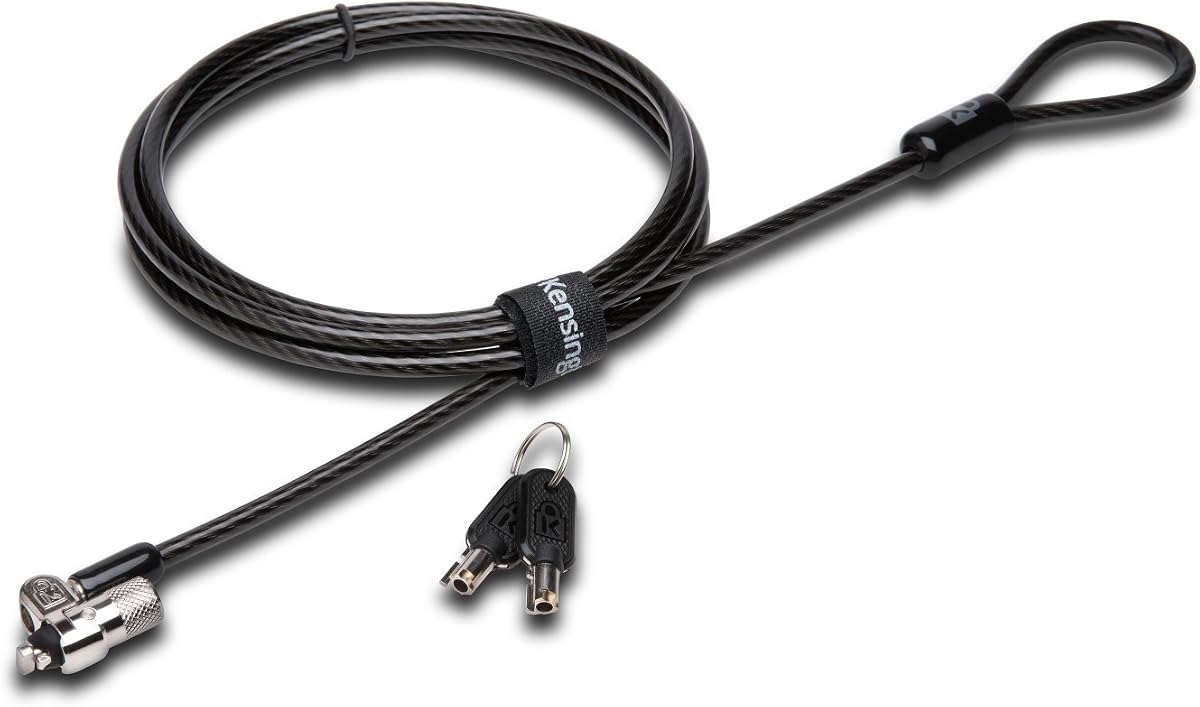
The Kensington Combination Laptop Lock is designed to support thin laptops using nano sized lock slots. Its slim lock head allows your device to lie flat and stable while remaining securely attached.
We may earn a commission when you buy through this link, at no additional cost to you.
It features a 5-foot carbon steel cable that resists cutting attempts and includes an anti-shearing plastic sleeve. The lock tip rotates 360º allowing access to ports near the lock slot on most devices.
The resettable 4-wheel number code provides 10000 possible combinations for custom security settings. However the shorter cable length might limit placement options compared to longer 6-foot or 8-foot alternatives.
This is an ideal budget choice for users with ultra-thin laptops that require a nano security slot. It delivers trusted brand quality at a lower cost without sacrificing essential security features.
The slim lock head is designed to support thin laptops using nano sized lock slots.
The lock tip rotates 360º and cable rotates up to 90º for convenient access.
We may earn a commission when you buy through this link, at no additional cost to you.
This hardware security cable lock is versatile enough to fit many tablets and laptops. It includes an anchor plate lined with strong adhesive for devices that do not have a standard lock slot.
We may earn a commission when you buy through this link, at no additional cost to you.
The lock head is made of super-strong stainless steel and can be rotated 360 degrees for flexibility. The cable is made of cut-resistant twisted steel with a PVC coat and measures 6.5 feet in length.
Users should be aware that some models may need the I3C adhesive security plate which might require a separate purchase. It is essential to check compatibility before relying solely on the included accessories.
It is a practical choice for securing a mix of devices including iPads and Windows tablets in public spaces. The dual installation options make it adaptable for various security needs.
The anchor plate allows securing tablets without standard lock slots via strong adhesive.
Cut-resistant twisted steel with a PVC coat protects against wear and damage.
We may earn a commission when you buy through this link, at no additional cost to you.
The AboveTEK Laptop Lock provides a complete security set with 2 sets of adhesive stickers and anchor plates. It is a true laptop notebook and iPad lock that gives peace of mind in public places.
We may earn a commission when you buy through this link, at no additional cost to you.
Its industrial grade 3M adhesive provides strong adhesive power to most flat surfaces to prevent tablets from being pulled away. The cut-resistant galvanized steel cable measures 6 feet to allow easy movement while secured.
The minimalist design ensures easy installation in seconds and integrates seamlessly with sleek mobile devices. Users should note this lock uses two keys instead of a combination code which might require key management.
This product is excellent for protecting various gadgets in public libraries or retail stores. The universal compatibility and adhesive options make it a versatile choice for diverse electronic devices.
Value pack includes 2 sets of adhesive stickers and anchor plates for multiple devices.
Cut-resistant galvanized steel cable and high-quality stainless steel lock ensure durability.
We may earn a commission when you buy through this link, at no additional cost to you.
This anti-theft security cable works for MacBooks and tablets even without a security slot due to included adhesive anchors. The cable is made of hardened 7×19 braided steel with a 3.0mm steel core for strength.
We may earn a commission when you buy through this link, at no additional cost to you.
It withstands up to 1800N pulling force while the cable ring holds up to 1200N without breaking. The anchor plate uses industrial adhesive that can bear over 100lb of weight once fully cured.
Each lock comes with 3 keys keyed different and both the lock and keys have traceable number codes. This allows for replacement keys if lost which is a significant convenience for long-term security.
It is ideal for those who want a flexible solution that does not require a built-in slot. The durable construction and adhesive options make it a strong contender for securing high-value devices.
The cable withstands up to 1800N pulling force for exceptional security.
Industrial adhesive bears over 100lb once cured and leaves no residue.
We may earn a commission when you buy through this link, at no additional cost to you.
The AboveTEK MacBook & Surface Laptop Locking Station is a desk mount designed to fit a wide range of laptops from 12 to 16 inches. It features a keyed laptop lock and a lengthy cable for secure tethering.
We may earn a commission when you buy through this link, at no additional cost to you.
Equipped with a pivot hinge the station allows for 45 to 125 degree viewing angles for ergonomic comfort. It is built with durable zinc alloy and ABS and includes heat-dissipating properties to keep laptops cool.
This product is ideal for users who value both security and ergonomics in a fixed setup. Its non-slip surface ensures stability during use and it is lightweight enough to be portable when needed.
It is the best choice for a dedicated desk environment like a shop or library where flexibility is key. The dual lock clips ensure a secure fit for various laptop thicknesses.
The pivot hinge allows for 45 to 125 degree viewing angles for comfort.
Built-in heat-dissipating properties keep your laptop cool during prolonged use.
We may earn a commission when you buy through this link, at no additional cost to you.
The StarTech Universal Laptop Cable Lock features interchangeable lock tips compatible with Kensington style K-Slot Nano and Noble Wedge Slots. It offers a 6.6ft durable security cable and includes a Hook and Loop strap.
We may earn a commission when you buy through this link, at no additional cost to you.
Its anti-theft keyless 4-digit resettable combo code allows for up to 10,000 combinations. The lock head is 16mm in diameter and features a ball joint design enabling it to rotate 360 degrees.
This lock is compatible with brands including HP Lenovo Acer and Asus as well as Dell Precision and Latitude. It also supports ultrathin devices like HP EliteBooks and Chromebooks with nano slots.
It is a versatile solution for users with multiple devices or mixed device environments. The thoughtful design and wide compatibility make it a robust choice for diverse security needs.
Interchangeable lock tips compatible with Kensington style K-Slot Nano and Noble Wedge Slots.
Ball joint design enables lock head to rotate 360 degrees for better access.
We may earn a commission when you buy through this link, at no additional cost to you.
Choosing the right locking cable involves considering compatibility build quality and ease of use. This guide outlines the key factors to help you select the most secure option for your specific device.
The most critical factor is matching the lock tip to your device's security slot. Most laptops use the standard Kensington K-Slot but some brands like Dell use a wedge slot while ultra-thin devices may use a nano slot. Always check your laptop model specifications before purchasing to ensure the lock will fit securely.
If your device lacks a slot consider locks with adhesive anchors but ensure the adhesive is strong enough for your usage environment.
Cable length determines how far you can move away from your anchor point. Most models offer around 6 feet which is sufficient for coffee shops and libraries. Look for carbon steel or galvanized steel cables with cut-resistant properties to prevent thieves from easily severing the lock.
Vinyl or plastic sheaths are also important to prevent scratching your desk or device during use.
Combination locks allow you to reset codes using 4-digit numbers offering flexibility if you forget your key. Keyed locks require physical keys but offer a different level of security. Consider if you prefer the convenience of a combo or the reliability of a keyed mechanism.
Ensure the lock includes a reset feature if you opt for a combination lock to maintain security over time.
Look for locks made with hardened steel and robust construction that can withstand pulling force. Independent testing for standards in torque and corrosion resistance ensures the lock will perform under stress. A high-quality lock head often includes anti-pick technology for better protection.
Check for warranties or technical support offered by the manufacturer to guarantee long-term usability.
For devices without security slots the adhesive anchor plate is essential. Ensure it uses industrial-grade adhesive like 3M that can hold significant weight. Some plates allow removal without residue which is helpful if you need to change your setup later.
Allow the adhesive to cure fully for maximum holding capacity to prevent accidental dislodging.
Lightweight and compact designs are ideal for those who carry their lock daily. Slim lock heads are better for ultra-thin laptops that cannot accommodate bulky mechanisms. Some kits include extra accessories like hooks or straps for added convenience.
A pivoting head or rotating anchor can make locking and unlocking easier in tight spaces.
Some locks come with multiple keys or traceable codes for replacement if lost. Kits that include multiple anchors allow you to secure multiple devices at once. Consider these extras if you manage a fleet of devices or use multiple tablets.
Check if the lock supports heat dissipation or ergonomic designs if used at a desk for long periods.
Prices vary from budget options to premium docking stations. Consider the value of additional features like adjustable arms or universal tips. Higher prices often correlate with better build quality and longer warranties.
Balance your budget with the level of security required for your specific use case.
To use a cable lock with a security slot insert the lock head directly into the slot until it clicks securely. If using an adhesive anchor attach the plate to the device surface and allow the adhesive to cure for 24 to 48 hours before use.
Once attached loop the cable around a fixed object like a desk leg and ensure it is tight enough to prevent slack. Engage the lock mechanism by either turning the key or entering your combination code to secure the device.
To care for your lock regularly inspect the cable for signs of wear or fraying. Keep the lock head clean from dust and debris to ensure smooth operation. Store the lock in a dry place to prevent corrosion and maintain the integrity of the steel.
Not all cables work on every laptop since many have different slot types like Kensington T-Bar wedge or nano. Always check your device specifications to match the lock tip with the slot. Some universal locks offer interchangeable tips to cover multiple slot types.
Yes you can use cable locks with adhesive anchor plates on devices without security slots. These plates stick to the device surface and provide a secure anchor point. Ensure the adhesive is industrial grade to hold the weight of your device.
Most standard laptop locking cables are around 6 feet long. Some models offer longer cables up to 8 feet while others may be shorter for portability. Choose a length that allows comfortable movement while keeping your device secure.
Combination locks are convenient because you do not need to carry a physical key. Keyed locks are often more durable and harder to pick. Choose the one that fits your preference for convenience versus traditional security.
If you forget your combination code consult the manufacturer instructions for a reset procedure. Some locks have a reset button while others may require a factory reset. Always set a memorable code to avoid losing access to your lock.
Laptop locks deter grab-and-run theft but are not indestructible against heavy tools. They provide peace of mind in public spaces but should be used with vigilance. For maximum security use them with a fixed anchor and remain nearby.
We reviewed ten top-rated locking cables including options from Kensington and AboveTEK that suit various needs from standard slots to universal compatibility. Our top picks highlight the best budget and premium choices available in the market.
When selecting a lock prioritize compatibility with your device and the strength of the cable. Ensure the locking mechanism fits your workflow whether it is a combination or key system.
Always check current product prices and availability before purchasing to get the best deal. Security is an investment and choosing the right cable will keep your devices safe in any environment.